Cameras and doorbells · eufy (Anker)
eufy camera and HomeBase Wi-Fi: 2.4 vs 5 GHz, setup and going offline
eufy Security cameras and doorbells either join your Wi-Fi directly or connect to a eufy HomeBase that connects to your router. Both are set up in the Anker eufy app.
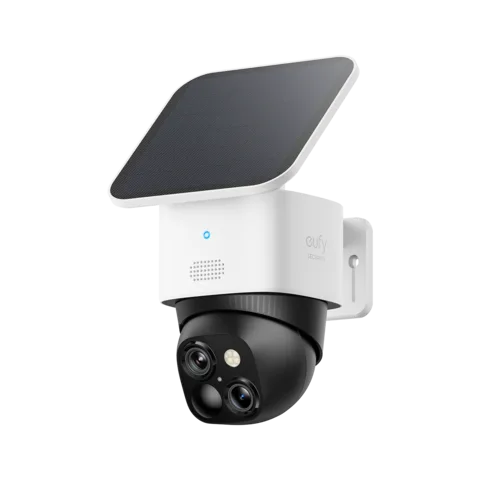
- Wi-Fi
- 2.4 GHz on most models; dual-band Wi-Fi 6 (2.4 and 5 GHz) on some newer ones, such as the Floodlight Cam E340 and Indoor Cam S350.
- Security
- eufy lists WPA/WPA2 in general requirements and WPA3 for dual-band Wi-Fi 6 devices. Check the exact model.
- App
- Anker eufy app (eufy Security)
- Models
- SoloCam S340, SoloCam S220, eufyCam S330 (eufyCam 3), Indoor Cam S350, Indoor Cam 2K, Floodlight Cam E340, Video Doorbell E340, Wall Light Cam S100, HomeBase S380 (HomeBase 3), HomeBase 2
Wi-Fi it needs
eufy’s general requirements are a 2.4 GHz network with WPA or WPA2 and at least 2 Mbps of upload speed. Some newer models are dual band and support WPA3.
- 2.4 GHz only: SoloCam models (including the S220 and S340), eufyCam C37, Wall Light Cam S100 and the HomeBase. eufy says these can’t join 5 GHz.
- Dual band: the Floodlight Cam E340 has dual-band Wi-Fi 6 and the Indoor Cam S350 joins 2.4 or 5 GHz. eufy recommends 5 GHz for smoother live view and 2.4 GHz for range.
- Security: eufy’s general requirements list WPA or WPA2; its dual-band Wi-Fi 6 guidance also lists WPA3.
- One name for both bands: for a 2.4 GHz-only camera, eufy suggests a dedicated 2.4 GHz network. A network name alone does not establish which band it uses.
- Hidden networks: the SoloCam needs the network name to be visible, not hidden.
- Special characters: if a camera won’t connect, eufy suggests removing special characters from the Wi-Fi password.
- Channels: in the US, eufy asks for a 2.4 GHz channel between 1 and 11.
Set it up
Setup varies by model. For the SoloCam S340, eufy describes the following router connection steps.
Charge the SoloCam S340 fully.
In the Anker eufy app, open Devices › Add Device and choose SoloCam S340.
Select Connect to Router.
Hold SYNC for 2 seconds until it beeps, then tap Next.
On your phone, join the SoloCam network when prompted.
Select your 2.4 GHz Wi-Fi network, enter its password and tap Next.
Set up a HomeBase
Connect the HomeBase to a LAN port on your router with the supplied Ethernet cable.
Check its light turns red, and the Ethernet port light on the back is green.
Connect your phone to the same router, then add the HomeBase in the app.
Add cameras to the HomeBase with Add Device › Scan QR code.
eufy says a HomeBase must use Ethernet for first-time setup. HomeBase 2 and earlier can then switch to Wi-Fi; HomeBase 3 can use Wi-Fi after setup on firmware v3.1.5.1 or later. eufy’s older instructions differ; check the firmware and current model guidance.
Move it to a new Wi-Fi network
For devices other than HomeBase 3, open the device or the HomeBase, Wi-Fi Chime or Wi-Fi Bridge it works with.
Go to Settings › General › Wi-Fi Connection.
Tap Connection, choose Wi-Fi set up and enter the new password.
For HomeBase 3, eufy gives a different path: Settings › General › About Device › Connection › Wi-Fi Setup, with firmware v3.1.5.1 or later. Its other Wi-Fi-change article has older, conflicting HomeBase 3 guidance.
How much data it uses
eufy publishes monthly examples rather than a figure per quality, plus a minimum upload speed of 2 Mbps.
| eufy’s example | Data per month |
|---|---|
| A HomeBase and two cameras; three 30-second live views per camera a day, streaming at 100 KB/s | About 528 MB |
| 4G Starlight Camera; ten 10-second live views and 25 ten-second motion recordings a day | About 500 MB |
At eufy’s stated 100 KB/s, an hour of live view is about 360 MB (our arithmetic). eufy publishes no figures per resolution, such as 2K or 4K.
Guest, hotel and dorm Wi-Fi
A guest network can introduce restrictions during setup.
Check the venue’s network policy and the requirements for your exact model.
- HomeBase wiring: initial HomeBase setup needs Ethernet to the router. Access to a suitable LAN port varies by venue.
- Same network: some models require the phone and device to communicate locally. Client isolation may prevent that communication.
- Sign-in pages: check whether the venue requires a sign-in page and whether your device supports it.
- Hidden or enterprise networks: eufy asks for a visible network using WPA or WPA2 with a password.
When it won’t connect
Check you’re joining a 2.4 GHz network, unless the model supports 5 GHz.
Check the security requirements for your model, and make sure the network isn’t hidden.
Retype the Wi-Fi password, and try removing special characters from it.
Follow the setup prompts for your specific camera model.
Move the camera closer to the router.
For a HomeBase whose light stays red, turn on DHCP on the router.
Restart the router and try again.
When it keeps going offline
Check whether the camera’s battery has run out, and charge it.
Check whether you’ve changed router, or the Wi-Fi name or password.
Check the router itself is online; the SoloCam light turns solid red without internet.
Open Settings › General › Wi-Fi Connection; check the signal reading, then test again closer to the router.
Otherwise, move the camera closer to the router, away from obstacles and interference.
For a SoloCam, hold SYNC for at least 2 seconds until it beeps, then pair it again in the app.
Cameras that connect to a HomeBase
If you moved the camera recently, move it closer to the HomeBase.
Remove the offline camera in the app, then add it to the HomeBase again.
eufy says HomeBase 2 and earlier can, in theory, sit 50 ft (15 m) from the router. Walls, obstacles and the router’s position reduce that.
Manuals and support pages
- eufy Floodlight Camera E340 (dual-band Wi-Fi 6)
- eufy SoloCam S340 (2.4 GHz only)
- eufy Support: eufy Cameras Go Offline (eufyCam with HomeBase)
- eufy Support: How far can the HomeBase be placed from the router?
- eufy Support: How much data will the 4G Starlight Camera use?
- eufy Support: Why can’t my eufyCam C37 connect to 5G WiFi?
Questions
Does eufy work on 5 GHz Wi-Fi?
Most eufy cameras and the HomeBase are 2.4 GHz only. Some newer models with dual-band Wi-Fi 6, such as the Floodlight Cam E340 and Indoor Cam S350, also use 5 GHz.
Does the eufy HomeBase need Ethernet?
Yes, for first-time setup. HomeBase 2 and HomeBase 3 can switch to Wi-Fi after setup. HomeBase 3 needs firmware v3.1.5.1 or later.
How much upload speed does eufy need?
eufy asks for an internet connection with at least 2 Mbps of upload speed.
Sources
- eufy Support: Requirements for Using eufy Devices
- eufy Support: Understanding Dual-Band Wi-Fi 6 on eufy Devices
- eufy Support: Failed to Connect eufy S340 SoloCam to Wi-Fi Network
- eufy Support: Failed to Connect eufy SoloCam to WiFi Network
- eufy Support: S100 Wall Light Cam fails to connect to my WiFi network
- eufy Support: How to Change the Wi-Fi Details for eufy Devices
- eufy Support: eufy SoloCam Offline
- eufy Support: What is the average data consumption needed per month for eufyCams?
- eufy Support: HomeBase 3 Wi-Fi after setup
- eufy Support: Failed to add HomeBase 3 in the eufy app
Checked on 1 November 2026.
See your network from your Mac
Kilobat is a Mac menu-bar app with a CLI and an MCP server for AI agents. It lists the devices on your Wi-Fi and says when a new one joins, keeps a history of the router’s and the internet’s health, scans nearby channels, and shows which app on your Mac is using the network. Read the docs.
brew install seifip/kilobat/kilobat