A laptop and an espresso on a marble café table by a window at dusk

For digital nomads

Work from anywhere. Know the network first.

A new café, a coworking space, a phone hotspot at the airport. Kilobat tells you within seconds whether the Wi-Fi will hold a call, keeps your Mac from eating your data plan, and turns a good café into a card for the next nomad.

Download for Mac ↓
brew install seifip/kilobat/kilobat
  • Free forever
  • Pro $19 once
  • 14-day refunds
  • macOS 14+
  • Open-source CLI
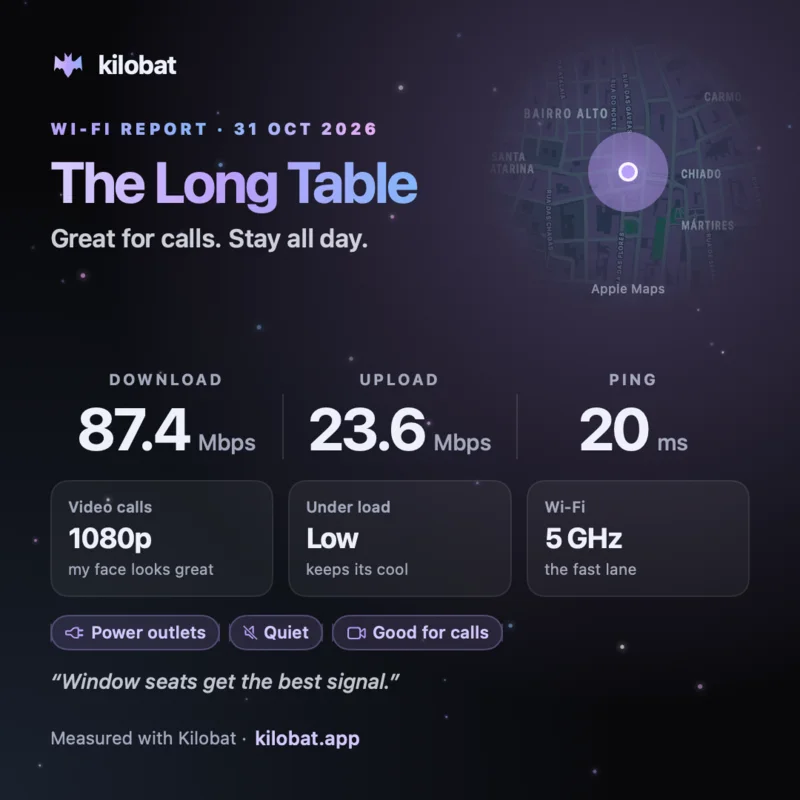
Kilobat’s This place card for a sample café: 87 Mbps down, 24 up, 20 ms ping, ready for 1080p video calls, with a small map and tags for power outlets, quiet and good for calls

Sound familiar?

One day, four networks.

Every network is a new problem. Here is what Kilobat does at each stop.

  1. 08:10 Airport

    A phone hotspot, and a data plan to protect.

    Mark the hotspot Metered once and Kilobat remembers it. Travel keeps everything but the apps you choose offline, updaters from Google, Microsoft, macOS and the App Store wait, and a budget that starts over like your plan stops new connections when it’s used up.

    Pro
  2. 10:30 Café

    Connected, but nothing loads.

    Why can’t it connect? names the layer that’s stuck, including a login page in the way, so you know to find the café’s portal rather than restart the Wi-Fi.

    Free
  3. 10:35 Café

    Will it hold a call?

    One speed test says whether voice and video calls will hold up, with latency under load. The stutter test catches the short drops a speed test averages away. Then share This place: a card with the café, a small map, the numbers and your tags.

    Free
  4. 14:00 Coworking

    The client call.

    Kilobat checks the line five minutes before the meeting and tells you if something would freeze it. Afterwards, the call’s report card says whether it froze and why.

    Free
  5. 22:00 Hotel

    Slow, and the front desk says it’s fine.

    The report button makes a summary of outages, latency and speed tests to show them, without your network’s name or addresses. Health shows whether your VPN carries everything, only some traffic, or nothing.

    Free

This place

Rate the café for the next nomad.

This place is a share card for the café, coworking space, hotel or library you’re working from. Pick it from Apple Maps search and the card shows a small map with a dot, your newest download, upload and ping on that network, video-call readiness, latency under load and the Wi-Fi band, plus tags such as Power outlets, Quiet or Open late and a one-line note.

  • The card never shows the Wi-Fi name.
  • The map shows the place you picked, not where you are, unless you choose Use my location.
  • Come back to the same café and the card starts filled in.

Free. The numbers come from your newest speed test on that network. Right-click the menu-bar icon › Share & Export, or open kilobat://share/place. The card at the top of this page is drawn from sample numbers, for a café we made up.

Free
228Mbps down↑ 44 Mbps · 24 ms
Stutter test3 spikes
Median5 msp9996 msWorst182 ms
  • Voice calls
  • Video · 1080p
  • Streaming · 4K

Will this call hold up? A speed test for capacity, and a stutter test for the short spikes that speed tests average away.

Metered networks

Hotspot data that lasts the trip.

A Mac assumes it’s on unlimited Wi-Fi. On a hotspot that means photo sync, backups and updates the moment you tether. Kilobat holds them back on metered networks, and the apps you allowed keep working.

  • macOS flags iPhone hotspots as metered. Mark an Android hotspot, a travel router or pocket Wi-Fi once.
  • Budgets start over daily, weekly or on the day your plan renews.
  • Put your carrier’s figure beside Kilobat’s to see why they differ.

More on the hotspot data page.

Pro Travel · on a metered network
Cloud backup
Google UpdaterPaused
macOS Software UpdatePaused

Hotspot data gone in an hour? Travel blocks backups, and updaters wait until you’re off the hotspot. The apps keep working.

Signal radar

Find the good seat.

Signal radar scores the Wi-Fi as you carry the laptop around and tells you when you’ve found the strongest spot, or when the last one was better. Save spots by name to compare the window seat with the back room.

  • Keep the Mac awake through long uploads and agent runs, even with the lid closed, when you allow it.
  • Switch DNS when a hotel’s resolver is slow, and back to Automatic.

Radar is part of Pro. Keep-awake is free.

Pro

Getting warmer. Keep going.

This Mac−48 dBm
Router2 ms
Internet24 ms
DNS212 ms

DNS lookups are slow. Compare Cloudflare or Google DNS, then restore Automatic if it does not help.

Slow internet, but why? Kilobat checks Wi-Fi, router, internet and DNS, and names the culprit.

What’s free, and what Pro adds

Free, for good

  • Speed and stutter tests that say whether calls will hold up
  • Why can’t it connect?, including login pages
  • This place cards for cafés and coworking spaces
  • Where traffic leaves: whether your VPN carries everything
  • A report for the host or your provider
  • Live traffic per app, and marking networks metered
  • Keep-awake, even with the lid closed

Pro, $19 once

  • Travel: only the apps you choose on a hotspot
  • Updaters paused on metered networks
  • Data budgets and per-app quotas that start over like your plan
  • Signal radar and Wi-Fi health
  • Call reports that name the cause, and Call mode

Pro is $19 once for two Macs, with a 7-day free trial and 14-day refunds. Free for students.

Questions

Does it know when I’m on a hotspot?

macOS flags iPhone hotspots as metered. Mark any other network, such as an Android hotspot, a travel router or a pocket Wi-Fi, as metered once, and Kilobat remembers it.

Does it work with my VPN?

Yes. Kilobat reads the routes on your Mac to show whether the VPN carries all, some or none of your traffic, and checks sites through the tunnel and directly. Proxy apps such as Clash and Surge are covered too: see Kilobat for proxy and VPN users.

Does the This place card give away where I am?

No. It shows the place you pick from Apple Maps search, never the Wi-Fi name, and uses your location only if you choose Use my location.

Is it free?

Live traffic, speed and stutter tests, This place cards, the VPN view and the provider report are free. Travel, budgets, radar and history are part of Pro, $19 once, with a 7-day free trial. Students get Pro free.

Open the laptop anywhere.

Download for Mac ↓
brew install seifip/kilobat/kilobat