Let agents run. Each agent run shows up from its own hooks: working, waiting for you, done or failed. Kilobat keeps the Mac awake while they work, with the lid closed if you allow it, or only while an app like Keynote is in front.
For SSH and remote desktops
Know why the terminal lagged.
Keystrokes that show up a second late. A Parsec screen that freezes mid-drag. Kilobat watches the line to the server while you work and, when the session ends, says how often it lagged and why, down to whether the server or your Wi-Fi was to blame.
brew install seifip/kilobat/kilobat- Free forever
- Pro $19 once
- 14-day refunds
- macOS 14+
- Open-source CLI
# Why did typing lag?
$ kilobat remote --limit 1
SSH to build.example.com, 38 min
✗ Typing lagged 4 times: jitter on
your Wi-Fi or router (RTT to the
server swung 41→610 ms)
Try a cable or the 5 GHz band.
Try Mosh for this server: it echoes
your typing at once.Sound familiar?
- “Typing over ssh feels like wading through syrup.”
- “Is it my Wi-Fi, or is the server swapping again?”
- “Parsec stutters, but the speed test says 500 Mbps.”
- “Should I just switch to Mosh?”
Nine reasons a session lags. Kilobat names which one.
Once a second while you work, Kilobat pings the server, the internet and your router, reads the connection’s own TCP round trip from macOS, and notes which other apps are busy. Nothing in the session is read.
Keystrokes arrive in bursts on Wi-Fi
Jitter on the Wi-Fi or router: the round trip swings from 40 ms to half a second.
Names the Wi-Fi, shows how far the round trip swung, and for SSH suggests Mosh. Pro
The screen freezes while a folder syncs
Another app on your Mac filling the upload or download: Dropbox, iCloud, a backup, Steam.
Names the app and whether it was uploading. Pro
Lag with nothing running on the Mac
Another device on your network streaming or downloading.
When your router shares its traffic counters (UPnP), Kilobat sees the line busy with traffic your Mac didn’t send. Pro
Short hiccups on a beat
AirDrop scanning: the Mac’s radio hops channels to look for nearby devices.
Named, with low latency mode to pause AirDrop while you work. Pro
Everything slows at once
Your provider or beyond it.
Router fine, internet slow too: it says so, and the report for your provider proves it over time. Pro
Only this server is slow
The path to the server, past your provider.
The internet answered on time and the server didn’t, so the delay was near the server or its network. Pro
Typing waits, but the line looks fine
The server itself, busy or swapping.
Your keystrokes went unanswered while the server answered pings at once. Said only after it happened twice. Pro
Every keystroke feels late
The server is far away.
A round trip of 150 ms or more is named even on a clean line, with Mosh as the fix. Pro
Clean line, choppy remote screen anyway
The Mac itself: CPU maxed out, memory running out, running hot, or the GPU saturated.
Says which, and which app used the CPU. Pro
From the first keystroke to the report.
Kilobat finds sessions by their process, not by asking you to start anything. It counts ssh and mosh in a terminal, and Screen Sharing, Parsec, Jump Desktop, Windows App, AnyDesk, TeamViewer and RustDesk.
- The first minute
Only real sessions count.
An ssh counts when it has a terminal of its own and you type into it for a minute. scp, sftp, rsync, git over ssh, tunnels with -N, ProxyJump hops and an editor’s or agent’s background ssh never do. A remote desktop counts once it shows a screen and you work in it.
- While you work
The line, measured once a second.
Pings to the server, the internet and your router, the connection’s TCP round trip every few seconds, the busiest other app and the Mac’s load: the call report engine, pointed at your server. A server that ignores ping is measured through its TCP round trip instead.
- After
The report.
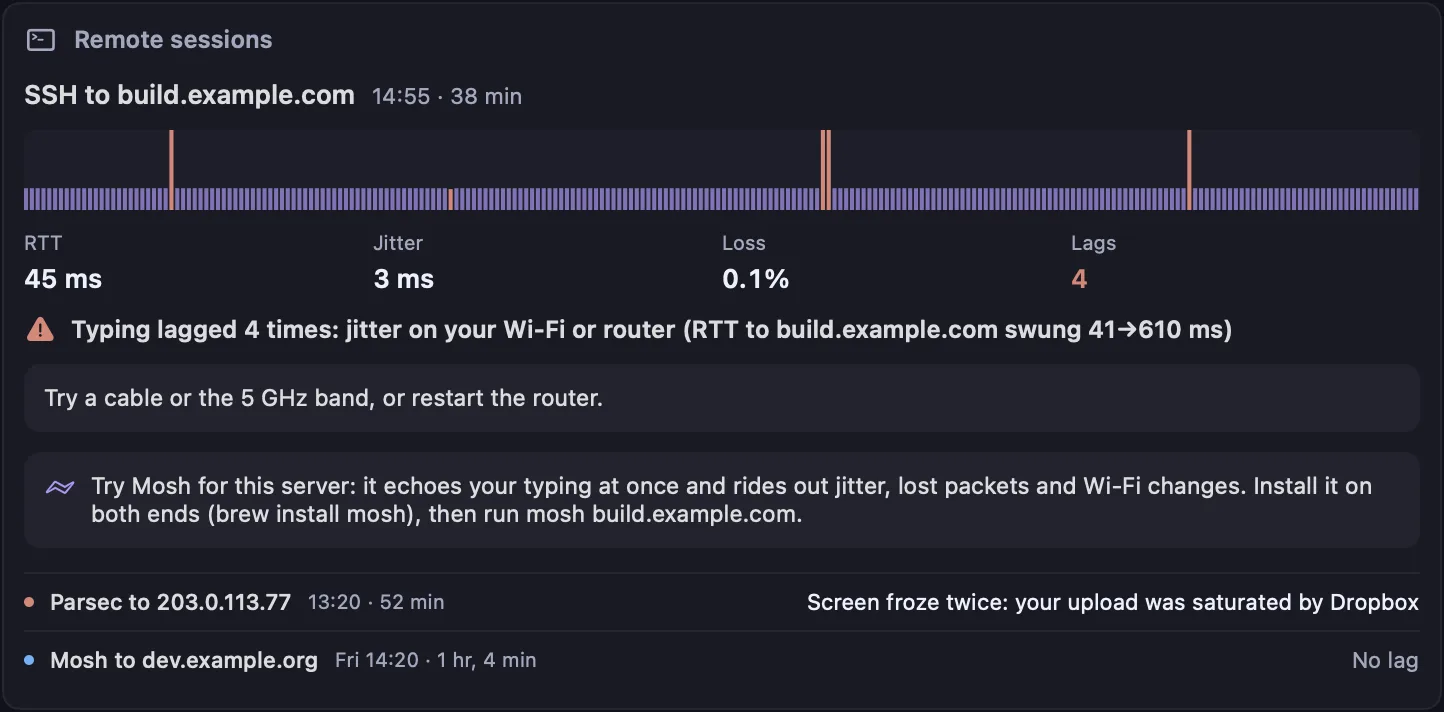
A card in Health › Remote sessions with the round trip second by second and each lag in rose. A notification only when the session lagged or froze. Kilobat counts the lags for free; Pro names each cause, what to try and when Mosh would help.
Free
The report
Every lag, on a timeline.
Health › Remote sessions shows the round trip to the server second by second, each lag in rose, the ping, jitter and loss, and the cause in one sentence: “Typing lagged 4 times: jitter on your Wi-Fi or router (RTT to build.example.com swung 41→610 ms).” Earlier sessions sit underneath, one line each.

Mosh, when it helps
The fix, not just the blame.
SSH waits for the server to echo every keystroke, so a round trip that swings or drops packets makes typing stutter. Mosh echoes your typing at once and rides out lost packets and Wi-Fi changes. When the lags came from the Wi-Fi, AirDrop, Starlink or the path, or the server is far away, the report says to try it. When an app, another device, the Mac or the server itself was the cause, it says what to fix instead.
# Recent sessions, each lag, its length and cause
$ kilobat remote
# Only remote desktops, for scripts
$ kilobat remote --kind desktop --jsonCoding agents read the reports through the MCP tool get_remote_session_reports. Read the docs.
What’s free, and what Pro adds
Free, for good
- How many times each session lagged or froze
- The round trip to the server, jitter and loss
- A stutter test that finds latency spikes
kilobat remoteand the MCP tool for agents
Pro, $19 once
- The cause of every lag, and what to try
- When Mosh would help, and when it wouldn’t
- Whether the server itself was slow
- Call reports and Call mode for your meetings
Pro is $19 once for two Macs, with a 7-day free trial and 14-day refunds. Free for students.
Questions
Does Kilobat read my SSH session?
No. It sees that an ssh or remote desktop process is running, the address it’s connected to and how many bytes it moves, which any network monitor sees. It never reads what you type or what comes back, and everything stays on your Mac.
Does it send anything to my server?
One ping a second to the server’s address while a session is open, the same as running ping in another tab. It never opens a connection to the server’s SSH port, so nothing shows up in its auth log.
Which apps does it work with?
ssh and mosh in Terminal, iTerm2, Ghostty, WezTerm, kitty, Alacritty, Warp, VS Code, Cursor and Zed, also under tmux; Screen Sharing, Parsec, Jump Desktop, Windows App (Microsoft Remote Desktop), AnyDesk, TeamViewer and RustDesk. Chrome Remote Desktop runs inside a browser tab, where Kilobat can’t tell it from the browser.
How does it know the server was slow, not my line?
Your keystrokes went out and nothing came back for two seconds or more, while the server answered pings at once and your router did too. Kilobat says so only when that happened at least twice in a session, and only for SSH, where every keystroke is echoed by the server.
Will it count git push or scp as a session?
No. A session needs a terminal of its own and a minute of typing into it. Copies, git, tunnels and ssh run by an editor or an AI agent in the background are left out.
Is it free?
Kilobat counts the lags for free. Kilobat Pro, $19 once with a 7-day free trial, names each cause, says what to try and when Mosh would help.
Make the next session the smooth one.
brew install seifip/kilobat/kilobat