Protection
Known-bad hosts stay out of reach. In every app.
Browsers warn about phishing pages. The rest of your Mac doesn’t. Kilobat refuses connections to known malware, phishing and scam hosts from any app, a coding agent’s npm install included, and tells you which app tried.
brew install seifip/kilobat/kilobat- Free forever
- Pro $19 once
- 14-day refunds
- macOS 14+
- Open-source CLI
● Installing dependencies
$ npm install
added 214 packages in 9s
> color-utils@4.1.2 postinstall
> node scripts/setup.js
✗ request to https://malware.example failed
✓ registry.npmjs.org  · 51 MB
Kilobat
Blocked: npm (started by Claude Code) tried to reach a known malware host
malware.example · Listed by URLhaus. Allow this site in Kilobat if it’s a mistake.
Sound familiar?
- “Did that npm install just phone home?”
- “My browser warns me. What about every other app?”
- “I let the agent run unattended. What did it reach?”
- “I want Pi-hole, but I want to know which app it was.”
A DNS blocker says a domain was blocked. Kilobat says who asked.
Pi-hole and NextDNS see a lookup from your Mac. Kilobat’s network filter sits on the Mac itself, so it knows the app and the process behind every connection, and the agent that started it.
An app you installed connects to a known malware host
The connection, the app and its signature, before a byte is sent.
Refused, with one notification naming the app and the list that has the host. Pro
A phishing link opens in a chat app’s own browser, or a mail app loads it
Every app’s connections, not just Safari’s and Chrome’s.
The page never loads, and Blocked attempts says which app opened it. Pro
A package’s install script, started by your coding agent, reaches out
The process tree: curl, under node, under npm, under a shell, under Claude Code.
“Blocked: npm (started by Claude Code) tried to reach a known malware host”, and a Blocked row in the agent network log. Pro
An app reaches a malware server by IP address, no name at all
Address lists from the same feeds, checked against the connection’s address.
Refused the same way. Pro
Apps load trackers and ads you never see
A tracker list you pick, off until you turn it on.
Blocked in every app, and one click allows a site when something breaks. Free
AI agents
Your coding agent can’t phone home to a known-bad host.
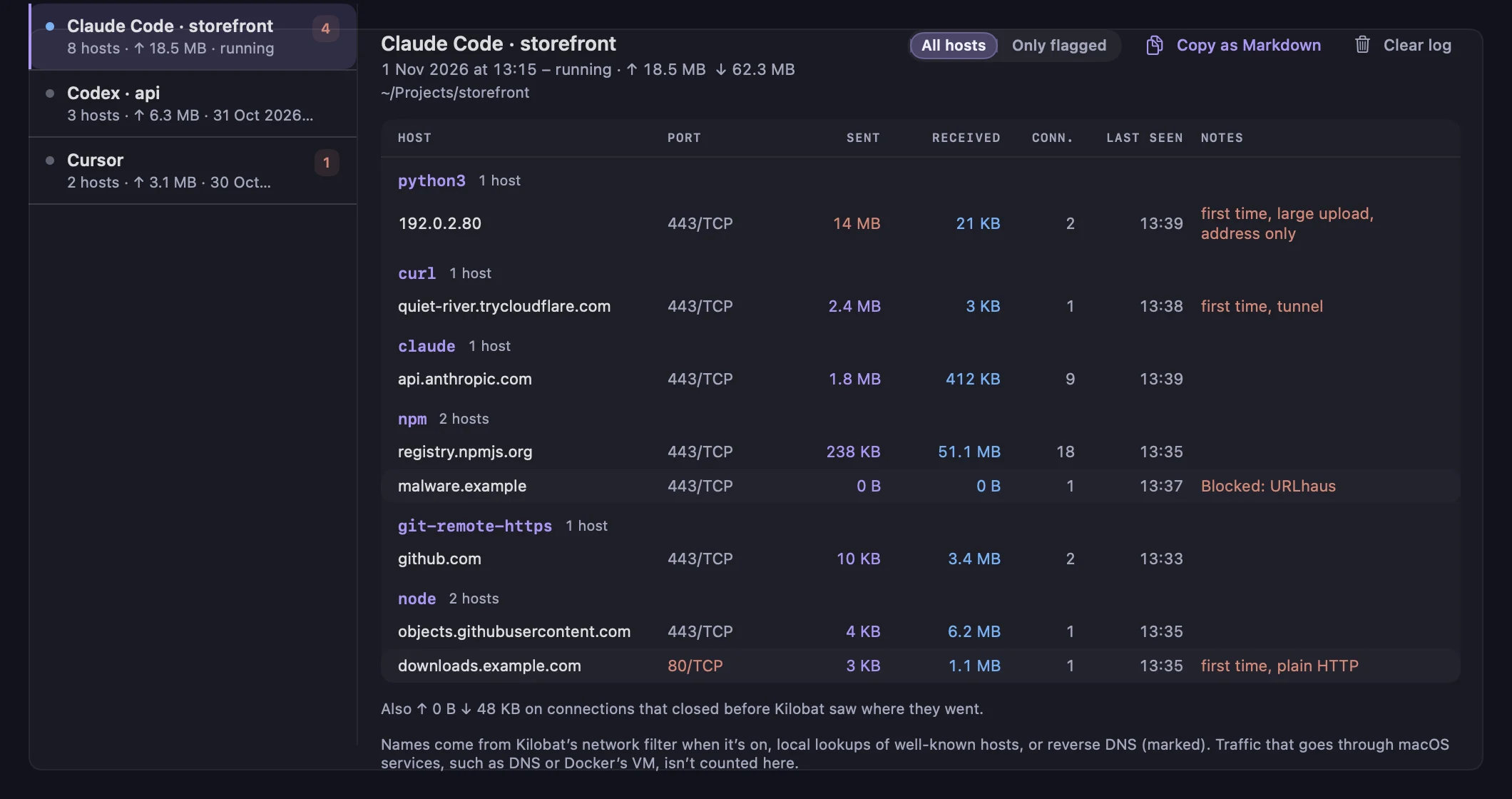
Claude Code, Codex, Cursor and Gemini CLI run npm, pip, curl and git for you, often unattended. When one of them, or anything it starts, tries a known malware, phishing or exfiltration host, Kilobat blocks it and says so, and the agent network log marks the row Blocked.
Turn on the agent guard for stricter rules that apply to agents only:
- No paste sites, file shares, tunnels or request catchers, such as pastebin, transfer.sh or a trycloudflare tunnel.
- No raw public IP addresses typed into a command.
- A connection that sends more than 10 MB to a host no agent on your Mac used before is cut off.
This is about known destinations, not intent. Kilobat doesn’t judge what the agent was trying to do; it keeps it away from places that are already known to be bad, and from the usual ways data leaves. Agents can ask first, with the MCP tool check_host_reputation.
Every app
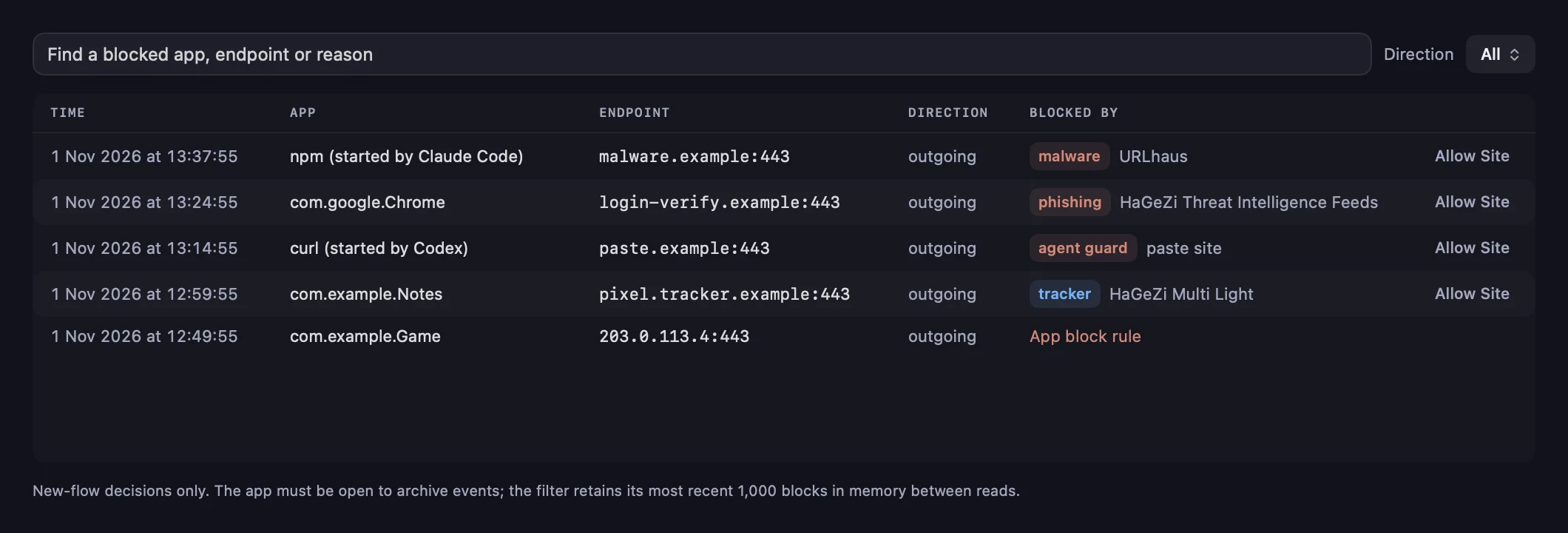
Blocked attempts, with the app and the list.
Connections › Blocked attempts lists what Protection refused: the app, the host, whether it was malware, phishing, a scam, a tracker or the agent guard, and the list that has it. One click allows the site if it’s a mistake.
- Known threats win over your own allow rules, in every profile. Only the local network, Apple’s own services, Kilobat and sites you allowed are never blocked.
- Notified once per app, host and day, never a flood.
- The menu shows a line only after something was blocked.
Trackers in apps
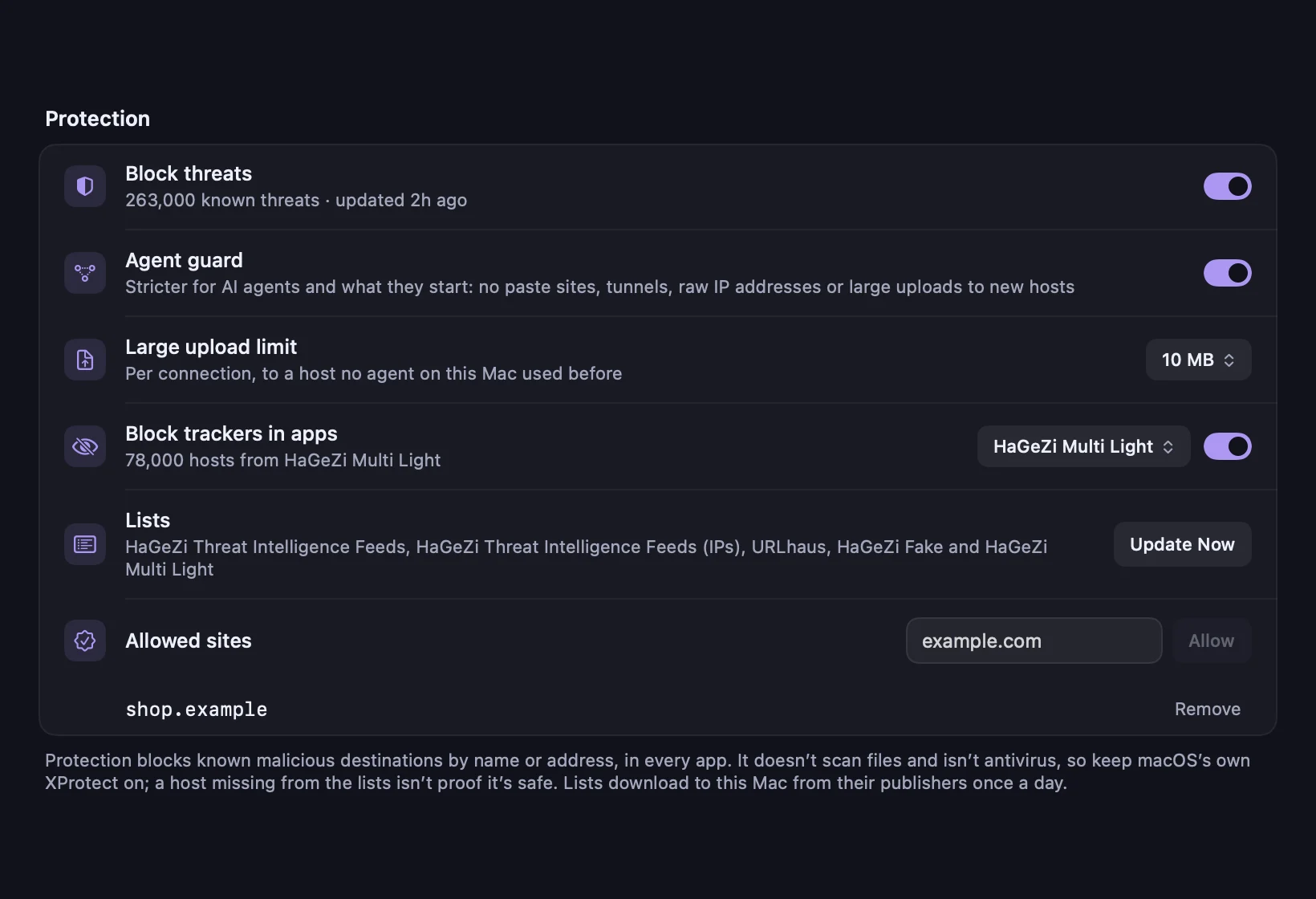
Block trackers in apps, when you want to.
Off by default. Turn on Block trackers in apps in Settings › Protection and pick a list: HaGeZi Multi Light, HaGeZi Multi Normal, OISD small or StevenBlack’s hosts. Your own allow rules always win over a tracker list, and Allow Site fixes an app that breaks. Free, no Pro needed.
Where the lists come from.
Kilobat downloads public lists to your Mac from their publishers once a day, keeps the last good copy if an update fails, and never sends your traffic anywhere to be checked.
- Malware
URLhaus, from abuse.ch.
Hosts and addresses that served malware, via malware-filter’s URLhaus list, updated twice a day.
Pro - Threats
HaGeZi Threat Intelligence Feeds.
Malware, phishing, scam and command-and-control hosts gathered from dozens of feeds, plus the matching IP list, updated several times a day.
Pro - Scams
HaGeZi Fake.
Fake shops, fake streaming sites, subscription traps and other scams.
Pro - Trackers
The list you choose.
HaGeZi Multi Light or Normal, OISD small, or StevenBlack’s hosts, only if you turn trackers on.
Free
Honest limits.
Protection is not antivirus. It doesn’t scan files or apps, and a host missing from the lists isn’t proof it’s safe. Keep macOS’s own XProtect and Gatekeeper on; they look at what you run, Kilobat looks at where it connects.
- It knows names from the connection itself: the name the app asked for, or the server name in its encrypted hello. An app that resolves names over its own encrypted DNS and then connects by QUIC, without telling macOS the name, is checked by address only.
- Data can still leave through hosts that aren’t on any list, such as a GitHub repository; the agent network log shows those uploads.
- It needs Kilobat’s network filter, which you turn on once.
What’s free, and what Pro adds
Free, for good
- Block trackers in apps, with the list you choose
- Allowed sites and one-click Allow Site
- kilobat protect check and the MCP tool check_host_reputation
Pro, $19 once
- Known malware, phishing and scam hosts blocked in every app
- The app and the agent named on every block
- The agent guard: paste sites, tunnels, raw IPs and big uploads to new hosts
- Blocked rows in the agent network log
Pro is $19 once, with a 7-day free trial.
Questions
Is this antivirus?
No. Kilobat never scans files. It refuses connections to hosts and addresses that public threat lists already name as malware, phishing or scams. Keep macOS’s XProtect on alongside it.
How is it different from Pi-hole or NextDNS?
Those work on DNS lookups, so they can say a domain was blocked but not which app asked, and they can’t tell npm from your browser. Kilobat’s filter runs on the Mac and sees each connection with its app, process and the agent that started it. You can use both.
Will it break things?
The threat lists favour few false positives, and Apple’s own services, the local network and Kilobat itself are never blocked. If a site you trust is blocked, Allow Site in Blocked attempts or Settings › Protection lets it through for good.
Does my agent have to do anything?
No. Protection applies to everything it starts. An agent connected to Kilobat’s MCP server can also call check_host_reputation before it fetches from an unfamiliar host, and get_protection_status to see what’s on. The tool that changes Protection tells agents to ask you first and never to turn it off to get a request through.
Does anything leave my Mac?
Only the list downloads, from each list’s own publisher. Kilobat checks hosts against the lists on your Mac and sends nothing about your connections anywhere.
What does it cost?
Blocking trackers in apps is free. Threat blocking and the agent guard are part of Kilobat Pro, $19 once with a 7-day free trial.
Keep every app away from known-bad hosts.
brew install seifip/kilobat/kilobat