Agent network log
What did your agent’s install talk to?
While Claude Code, Codex or Cursor works, Kilobat writes down every host it and the npm, pip, curl and git it starts contact, with the bytes sent. One look answers what that install reached, what got uploaded, and whether anything went somewhere new.
brew install seifip/kilobat/kilobat- Free forever
- Pro $19 once
- 14-day refunds
- macOS 14+
- Open-source CLI
$ kilobat agent-log
Claude Code · storefront · running
6 hosts · ↑ 18 MB ↓ 62 MB · 2 flagged
npm
  registry.npmjs.org      ↑ 238 KB  ↓ 51 MB
python3
! 192.0.2.80              ↑ 14 MB   ↓ 21 KB
  first time · large upload · address only
curl
! quiet-river.trycloudflare.com  ↑ 2.4 MB
  first time · tunnel
Sound familiar?
- “What did Claude Code connect to during that npm install?”
- “Did the agent upload my code anywhere?”
- “Monitor npm install network requests on a Mac.”
- “Which servers does Codex talk to?”
Questions an agent leaves behind.
An agent runs installers, scripts and tools you didn’t type. Kilobat follows its whole process tree, so what it started counts as the agent’s.
An install pulled in a package you don’t know.
Its install script fetched something from a host no agent used before.
The session lists that host under the process that fetched it, flagged first time. Pro
You wonder whether code or secrets left the Mac.
Uploads to the agent’s own service are normal; uploads elsewhere are not.
Over 10 MB to any other host is flagged large upload, with the bytes per host. Pro
The agent ran curl to a paste site or opened a tunnel.
Paste sites, file shares, tunnels and request catchers are how data commonly leaves.
A short, curated list flags them by name, along with plain HTTP and bare addresses. Pro
An agent wants to check its own work.
It can’t see the network beneath its tools.
The MCP tool agent_network_log returns the agent’s own session. Free
The log
Every host, by the process that reached it.
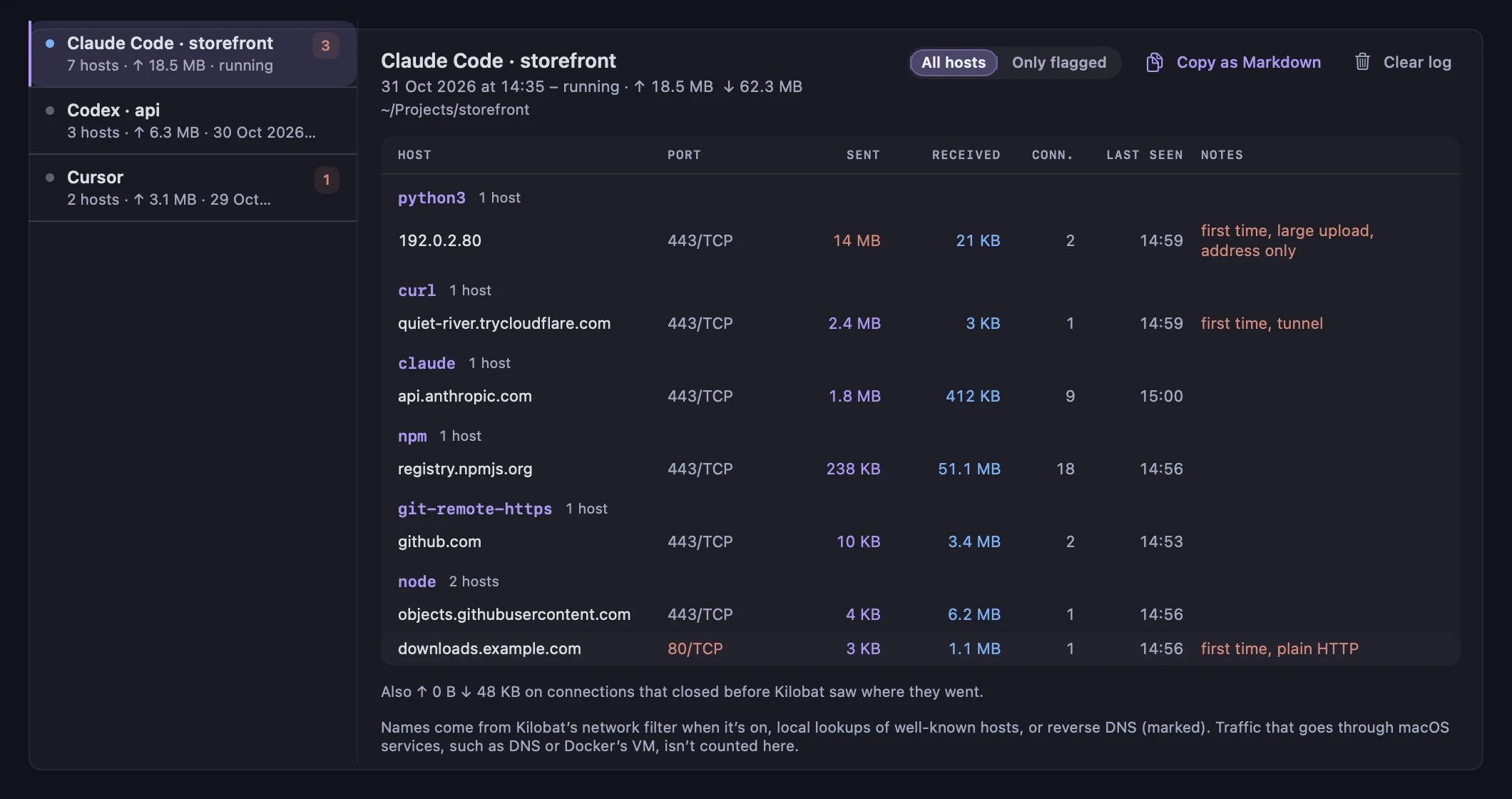
History › Agent network log lists each agent session, from when the agent starts until it and everything it started exit, with its project folder. Hosts are grouped by the process that connected, npm, node, curl or git-remote-https, and sorted by bytes sent, with port, protocol, connections and when each was last seen.
- Only flagged shows just the hosts worth a look.
- Copy as Markdown for an issue, a pull request or a security review.
- The menu shows one line while an agent runs: “Claude Code · 14 hosts · 2.1 MB up”.
- Kept 30 days on your Mac only, never sent anywhere; Clear log empties it.
How it knows
Shells, scripts and short-lived curls included.
Kilobat already reads macOS’s per-connection network statistics every second. It recognises Claude Code, Codex, Cursor, Gemini CLI, Aider, Windsurf, Claude Desktop and ChatGPT by their executable or the package node or Python runs, and the kernel tells it the moment a process in an agent’s tree forks, so a curl that lives a tenth of a second still counts. The nearest agent wins: Claude Code in Cursor’s terminal is Claude Code’s.
This page is about the log. To connect Kilobat’s MCP server, skills and hooks to your agent, so it keeps the Mac awake and knows when a run is done, see Set up Kilobat in your agent.
Names come from Kilobat’s network filter when it’s on, from matching well-known developer hosts and the hosts in the agent’s own curl and git URLs, or from reverse DNS, marked as such. Traffic macOS makes on a process’s behalf (DNS, nsurlsessiond), Docker and VMs, and agents inside an editor’s extension host, such as Cline in VS Code, can’t be told apart. The details.
# Record live, without the app
$ kilobat agent-log --watch
# Only what deserves a look, over the last day
$ kilobat agent-log --since 1d --flagged
# One agent, as JSON
$ kilobat agent-log --agent codex --json
What’s free, and what Pro adds
Free, for good
- kilobat agent-log --watch, recording live in the terminal
- Reading the log from the CLI and the MCP server
Pro, $19 once
- The agent network log, recorded in the background for every agent
- Flags for new hosts, uploads, plain HTTP, tunnels and paste sites
- 30 days of sessions, Copy as Markdown, the menu’s live line
The CLI and the MCP server are free and open source. Pro is $19 once, with a 7-day free trial.
Questions
Does Kilobat read my agent’s prompts or code?
No. It records hosts, ports, byte counts and process names from macOS’s own network statistics. It never sees what was sent, and never reads prompts or replies. For curl and git it reads the host part of the URLs they were given, never paths, queries or credentials.
Does the log leave my Mac?
No. It is saved in Application Support on your Mac for 30 days and never sent anywhere. To name addresses, Kilobat looks up a short list of well-known developer hosts with your Mac’s own resolver, usually from its cache.
Which agents does it recognise?
Claude Code, Codex, Cursor and Cursor Agent, Gemini CLI, Aider, Windsurf, OpenCode, Goose, Amp, Qwen Code, Copilot CLI, Crush, Claude Desktop and ChatGPT, and every process they start. Agents that run inside an editor’s extension host, such as Cline or Copilot in VS Code, share the editor’s processes and can’t be told apart.
Why does a host show only an address?
The process connected by address, or Kilobat couldn’t learn the name it asked for. Turn on Kilobat’s network filter to see the names apps ask for by name; otherwise reverse DNS gives the server’s own name where there is one, marked as such.
Is a flag a sign of an attack?
No. A flag means worth a look. A first-time host is often just a new package mirror, and a large upload can be a legitimate deploy. The log shows what was contacted, so you can decide.
Know what your agent touched.
brew install seifip/kilobat/kilobat