For Starlink
Know what your dish knows.
Your Starlink dish keeps a map of the sky, a log of every outage and why it happened. Kilobat reads it on your Mac and tells you whether that frozen call was the tree, the satellites or your Wi-Fi.
brew install seifip/kilobat/kilobat- Free forever
- Pro $19 once
- 14-day refunds
- macOS 14+
- Open-source CLI
Kilobat saysBlocked to the north-east, low in the sky, like a tree. Mounting the dish higher, or a few metres away from it, usually clears it.
RVs and vans
A new campsite every few days, and a new tree line each time. Check the sky before you level up.
Boats
Masts, rigging and a swinging anchor. See which side blocks the dish, and whether it moved.
Rural homes
When Starlink is the only line out, know if a drop was the oak or the network, and say so to support.
Remote work
Calls that freeze for two seconds every few minutes have a cause. Kilobat names it after every call.
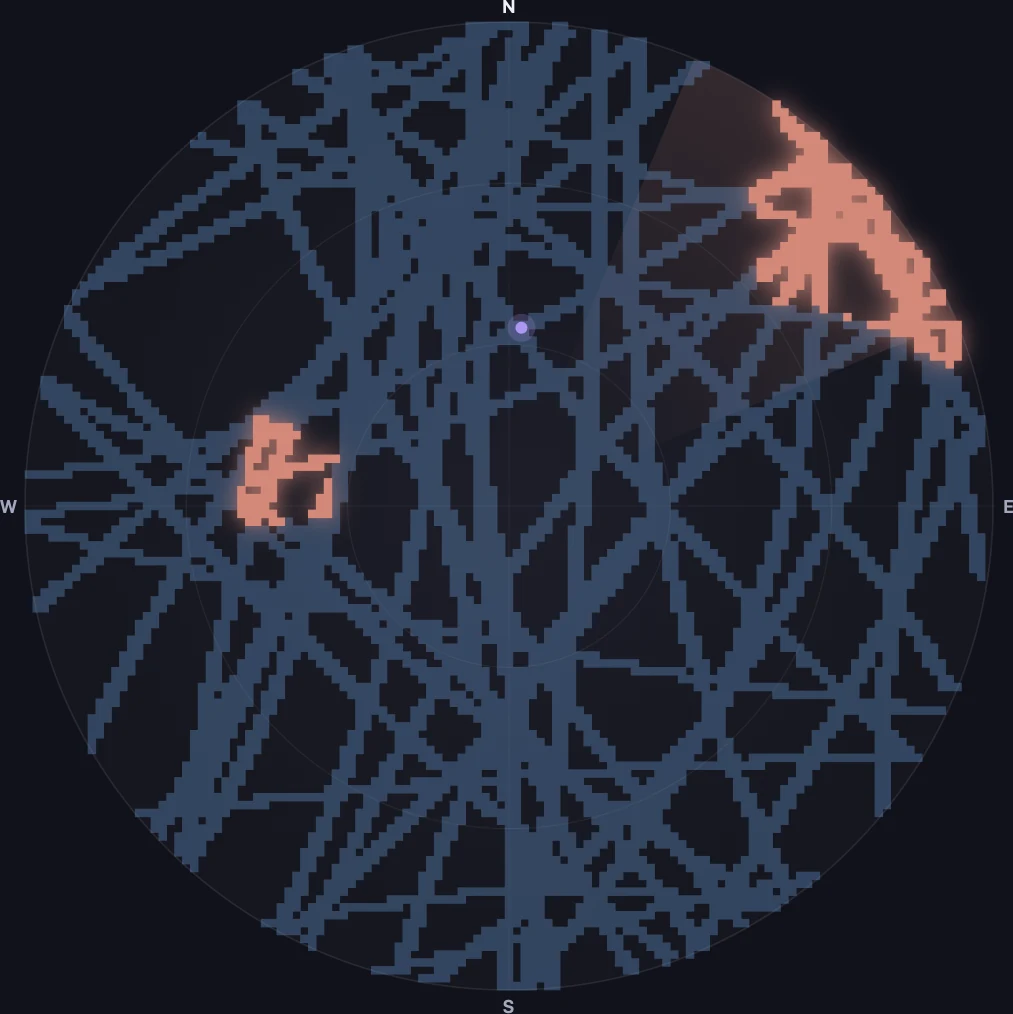
Find the tree. Then move the dish.
Every satellite the dish talks to leaves a trace on its map of the sky. Where the signal drops, something is in the way. Kilobat draws that map in plain colours, works out the compass direction and how high it is, and turns it into a sentence you can act on.
Blocked to the north-east, low in the sky, like a tree, a building or a hill. Mounting the dish higher, or a few metres away from it, usually clears it.
It also says how often the sky is blocked and for how long, from the dish’s own figures: 2.1 s about every 4 min is exactly the kind of block that freezes a video call and never shows in a speed test.
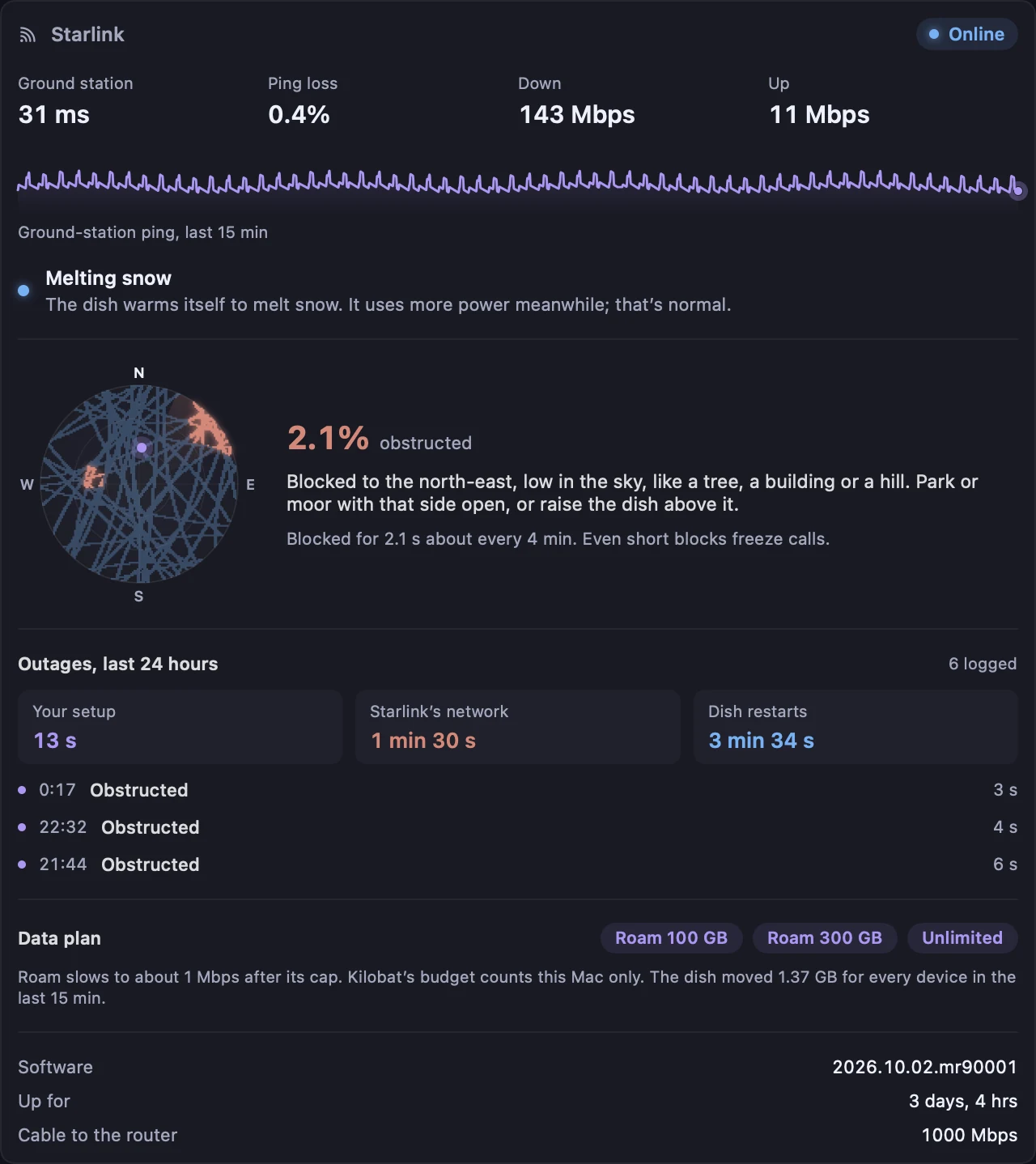
Your setup, or their network?
The dish logs every outage with a cause. Kilobat keeps that log on your Mac and sorts each outage to the side that can fix it.
Make a report for Starlink support and the dish’s log goes in it, split the same way, with the times. No serial number, no location.
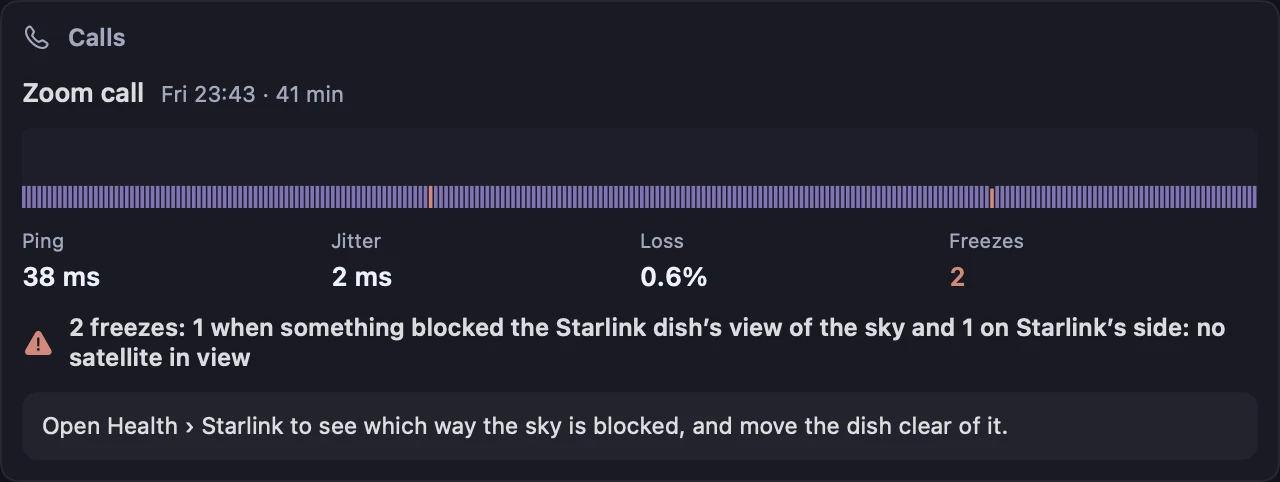
A freeze every few minutes has a name now.
After each Zoom, Teams, FaceTime or Meet call, Kilobat writes a report card. On Starlink it checks the dish’s log for each freeze: something blocked the sky, no satellite was in view, or the dish restarted. If none of those, it looks at your Wi-Fi and the other apps on your Mac, as it always does.
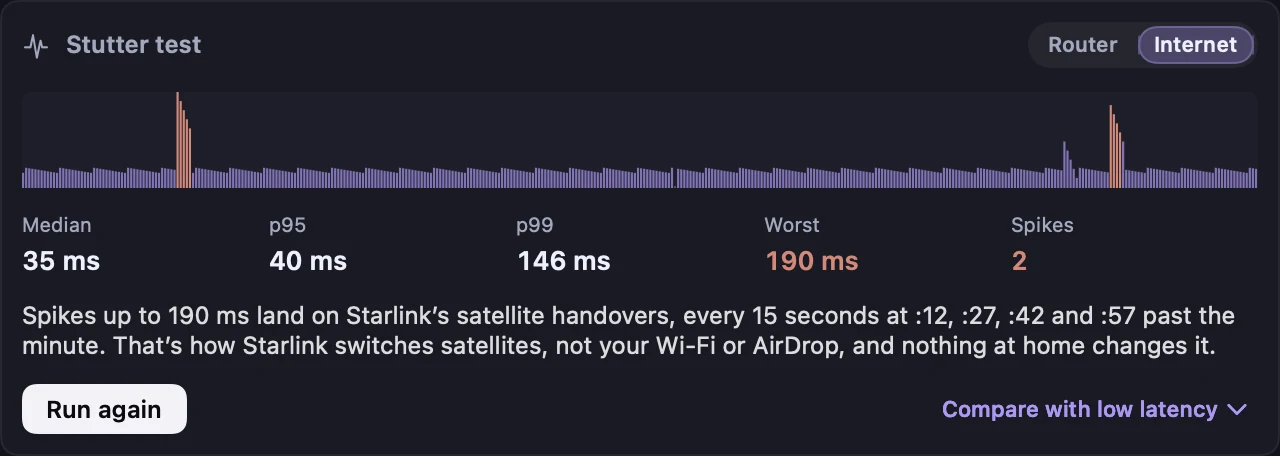
Researchers timed it to the second (Tanveer et al., 2023) and found it synchronized worldwide (Mohan et al., WWW 2024). Games and calls feel it as a short spike. When the stutter test’s spikes land on these seconds, Kilobat says so, instead of blaming your Wi-Fi or AirDrop. The dot runs on your clock.
Mark it metered. Set the budget to your plan.
On a capped Roam plan, one tap marks the dish’s network as metered, so Kilobat holds back updates and scheduled speed tests, and with Pro sets a monthly budget the size of your plan. The panel also shows what the dish itself carried for every device in the last 15 minutes, since a budget on your Mac only counts your Mac.
Plan names and caps as Starlink listed them in October 2026. Prices and caps differ by country and change often; check yours in the Starlink app.
The same answers, in one command.
kilobat starlink prints the dish’s state, ground-station ping, alerts, the sky map and the outage log, and --json gives scripts the same. AI agents read it through the MCP tool get_starlink_status, so you can ask “why did the internet drop last night?” and get the dish’s answer. Read the docs.
$ kilobat starlink
Starlink  Online  software 2026.08.10, up 1 hr, 5 min
Ground station  44 ms  drop 0.0%
Live            ↓ 7.4 Mbps  ↑ 0.1 Mbps  (all devices)
Obstructed      0.1% of the time over 2 hrs, clear now
Alerts          none

Blocked to the north-east, low in the sky, like a tree,
a building or a hill. Park or moor with that side open,
or raise the dish above it.

Outages, last 24 h:
  Your setup 2 s | Starlink’s network 5 s | Restarts 0 s
  Sat 00:36:35  2 s   Obstructed (Your setup)
  Sat 00:33:35  5 s   No satellites (Starlink’s network)
The dish talks to your Mac. Nobody else listens.
- Local onlyKilobat asks the dish at 192.168.100.1, on your own network. Nothing goes to Kilobat, Starlink or anyone else.
- Read-onlyIt never stows, reboots or reconfigures the dish. The Starlink app stays in charge.
- No accountNo Starlink login, no Kilobat account. The dish answers anyone on its network, and Kilobat only asks.
- Reports leave out the dishThe provider report keeps outage times and causes, and leaves out the serial number and location.
Questions
Which Starlink dishes work?
Any dish that answers on your network at 192.168.100.1, which is how the Starlink app talks to it. That includes the Standard and Mini kits. Firmware changes what each dish reports, so Kilobat shows what yours sends and leaves out what it doesn’t.
I use my own router in bypass mode. Does it still work?
Usually. Most routers pass 192.168.100.1 through to the dish. If yours doesn’t, add a static route to 192.168.100.0/24 through the WAN port, as router makers describe for reaching the dish.
Does Kilobat show anything when I’m not on Starlink?
No. It looks for a dish when the network changes and every few minutes, a single local request that fails in about a second when there is none. Without a dish, the Starlink panel stays out of the way.
Will it tell me whether to call Starlink support?
That’s the point of the outage split. Outages from obstructions, heat or power save are on your side; no satellites or no reply from the ground station are on Starlink’s. The report for your provider carries the dish’s own log with times and causes.
Why does my Starlink stutter in games when the speed test is fine?
Speed tests average over seconds. Starlink switches satellites every 15 seconds, and a game feels each switch as a short spike. Kilobat’s stutter test pings every 50 ms and says when the spikes line up with those switches.
Is it free?
The Starlink panel, sky map, outage log, stutter test, CLI and MCP tool are free, like the rest of Health. Kilobat Pro, $19 once with a 7-day free trial, names the cause of each call freeze and adds data budgets.
Is Kilobat made by Starlink?
No. Kilobat is an independent Mac app that works with Starlink hardware. It isn’t affiliated with or endorsed by Starlink or SpaceX.
See what your dish has been trying to tell you.
brew install seifip/kilobat/kilobatStarlink is a trademark of Space Exploration Technologies Corp. Kilobat isn’t affiliated with it.