Pro
Getting warmer. Keep going.
This Mac−48 dBm
Router2 ms
Internet24 ms
DNS212 ms
DNS lookups are slow. Compare Cloudflare or Google DNS, then restore Automatic if it does not help.
Satellite internet
A satellite link fails in its own ways. A second lost to a tree, a ping that never drops below 600 ms, a data allowance gone by the 12th. Kilobat measures your router and the internet from your Mac to help you narrow down the cause.
brew install seifip/kilobat/kilobatGetting warmer. Keep going.
DNS lookups are slow. Compare Cloudflare or Google DNS, then restore Automatic if it does not help.
A satellite connection is the usual chain with a very long middle. Kilobat measures what it can reach from your Mac, and on Starlink it reads the dish too.
Satellite links fail differently from cable or fibre. Low-orbit services like Starlink drop for seconds at a time; geostationary ones like Viasat and HughesNet are slow to answer all the time. Both may come with data rules. Some plans also use a shared IPv4 address.
Obstructions, weather or other network events can interrupt a connection. A speed test can average over brief drops.
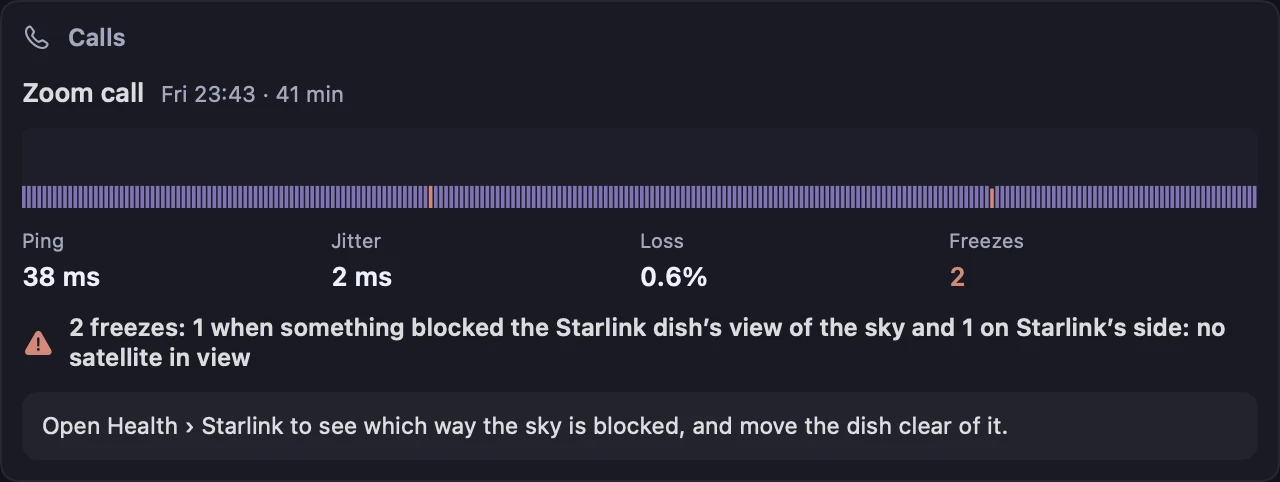
After each call, a report card names every freeze. On Starlink it checks the dish’s log for a blocked sky, no satellite in view or a restart before it looks at your Wi-Fi. Pro
Researchers observed a 15-second reconfiguration cycle at :12, :27, :42 and :57 past each minute. The schedule and its effects may change.
The stutter test pings every 50 ms for 20 seconds and says when the spikes land on those seconds. Free
A geostationary orbit, 35,786 km up. On Viasat or HughesNet that’s normal, not a fault.
Router and internet latency side by side help you distinguish Wi-Fi trouble from delay beyond your router. Game-server ping shows each region’s round trip before you queue. Free
The dish, the satellite or the provider, or your own router.
History logs each outage with whether your router kept answering. On Starlink, the dish’s own log sorts it into your setup, Starlink’s network or a restart. Pro
Updates, photo sync, backups and video, all assuming unlimited data.
Live usage for every app is free. Mark the network metered, and updaters wait, Travel holds back the rest and a budget starts over on your billing day. Pro
CGNAT. Many customers share one public IPv4 address, and nothing outside can open a connection in.
kilobat ip --public shows the address the internet sees, to compare with your router’s. Kilobat doesn’t test for CGNAT itself. Free
A VPN adds its own trip. Viasat says VPNs on its service may be slow or not work at all.
Health shows whether the VPN carries everything, some traffic or nothing. Each speed test records the VPN it went through, so you can compare two tests. Free
An outage at that service, not your dish.
Kilobat reads the service’s status page and says “down for everyone, not you” only when its page says so. Free
History › Where the delay starts plots two lines: your router and the internet. Kilobat checks about once a minute in the background, and more often while Health is open. Drops of a few seconds fall between those checks; call reports, the stutter test and, on Starlink, the dish’s own log catch them.
Starlink reports a median of 25.7 ms at peak hours across its US customers, as of June 2025. Your Wi-Fi adds a little on top.
Health’s tips will call the path past the router slow, since they’re set for land lines. That’s the orbit. Watch for changes from the usual level instead.
Handovers, an obstruction, rain or a busy cell. The delay appears beyond your router, though the checks cannot pinpoint its cause. Run the stutter test to see whether the spikes repeat.
Weak signal, a crowded channel or a busy router. Fix this first; it adds to every trip, satellite or not.
The dish, the satellites or the provider may be involved. Outage credit counts only outages with enough checks to identify the provider side; a responding router alone is not conclusive.
ProThe router, its power or the Wi-Fi. On Starlink, a dish restart shows in the dish’s own log.
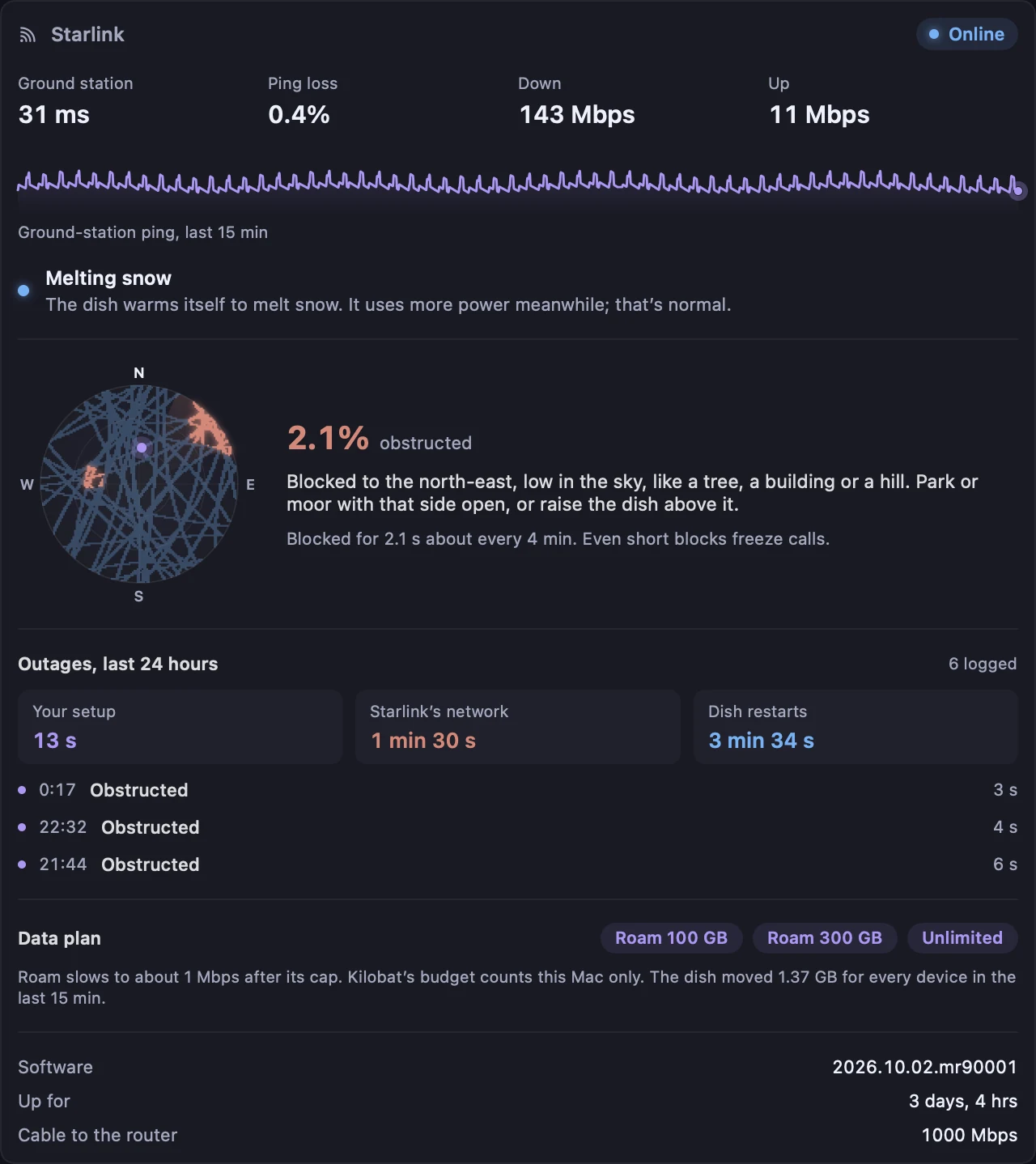
ProStarlink
The dish keeps a map of the sky and a log of every outage with its cause. Kilobat reads both on your own network, read-only, and turns them into sentences you can act on, such as “Blocked to the north-east, low in the sky, like a tree.”
Kilobat for Starlink has the rest.
Calls and games
During a Zoom, Teams, FaceTime or Meet call, Kilobat pings your router and the internet once a second. Two seconds lost in a row, or a ping 200 ms over the call’s usual, counts as a freeze, and each freeze gets a cause. On a satellite link that’s often beyond your router, and the card says so instead of blaming your Wi-Fi.
Data caps
Starlink Roam and Priority plans, Viasat Essentials and HughesNet’s Priority Data all run out or slow down. Kilobat shows which app used the data, holds updaters back on metered networks and stops new connections when your budget is spent.
# Treat the satellite link as metered
$ kilobat networks cost metered
# A 100 GB budget that starts over on the 14th
$ kilobat limit 100 --cycle monthly --reset-day 14
# Which updaters are waiting
$ kilobat updaters
Kilobat’s own speed tests use 80 MB at most and skip metered networks unless you start one. Put your provider’s usage figure beside Kilobat’s in History › Compare with your router or provider.
Budgets that work like your plan. Start over daily, weekly or on the day it renews, and give any app its own quota, or one just for uploads.
Your provider says more? Put their figure beside Kilobat’s for the same period, with the hours Kilobat recorded and the likely reasons for a difference.
Some satellite plans share public IPv4 addresses between customers, behind carrier-grade NAT (CGNAT). Going out works as usual. Coming in doesn’t: nothing on the internet can open a connection to your home over IPv4. That breaks port forwarding, hosting a game lobby or a Minecraft server, and reaching a camera, NAS or Plex at home from outside.
To check, look up your router’s internet (WAN) address and compare it with the one kilobat ip --public reports, asked from Cloudflare. If they differ, there may be another layer of NAT, including CGNAT or a VPN. A router WAN address in 100.64.0.0/10 indicates shared address space; ask your provider if you need to confirm CGNAT. Workarounds: IPv6 where both ends have it, a relay such as Tailscale, or a plan with a public address.
kilobat health-history, starlink, ip and the rest of the CLIPro is $29 once for two Macs, with a 7-day free trial and 14-day refunds. Free for students.
Yes, like any connection. It measures your router and the internet from your Mac, records outages and counts data by app. Only Starlink’s dish can be read directly, because it answers on your network the way the Starlink app reads it.
Its tips are set for land lines, where 120 ms is a lot. On a geostationary link, about 600 ms is normal. Look at the history for changes from that level, and at the router line for your Wi-Fi.
Very little. Its checks are pings and small requests. Speed tests use 80 MB at most and are skipped on metered networks unless you start one, and the scheduled plan check never runs on a metered network.
Not by itself. It shows the public address the internet sees, with kilobat ip --public or the setting Look up public IP. Compare that with your router’s internet address.
Background checks run about once a minute, so the history catches drops of a minute or more. Short drops show in call reports, the stutter test and, on Starlink, the dish’s own outage log.
Live usage, latency, the stutter test, game-server ping, the Starlink dish’s status and the whole CLI are free. History, call-freeze causes, Travel and budgets are part of Kilobat Pro, $29 once, with a 7-day free trial.
brew install seifip/kilobat/kilobat