
Internet provider · Germany
Deutsche Telekom slow or down?
Find out whether it’s your Wi-Fi, your Speedport or Deutsche Telekom’s line. Then give Deutsche Telekom what support can act on: dated measurements, the hours it fails and a clear request. Not “it’s slow”.
brew install seifip/kilobat/kilobat- Free forever
- Pro $29 once
- 14-day refunds
- macOS 14+
- Open-source CLI
- OK This Mac Settings, a VPN or one app hogging the line Who fixes itYou
- OK Wi-Fi Weak signal, a crowded channel, a far room Who fixes itYou
- OK Speedport The box itself: stuck, overheating or out of date Who fixes itYou, or Deutsche Telekom if it’s theirs
- Slow here Deutsche Telekom The line and the provider’s network Who fixes itDeutsche Telekom
- Not checked Sites and DNS One service, one route or name lookups Who fixes itDepends
Is it Deutsche Telekom, or your Wi-Fi?
A connection crosses five links before a page loads. Three of them are in your home, and support will ask about those first. Kilobat checks Wi-Fi, router, internet and DNS in turn and names the one that failed Pro, so you call Deutsche Telekom only when it’s Deutsche Telekom.
Slow on Wi-Fi, fine on a cable
Your Wi-Fi: distance, walls or a crowded channel.
Signal radar walks you to a stronger spot and names a quieter channel. Pro
Slow on a cable too, at the same hours every day
The line or Deutsche Telekom’s network, busy at peak time.
Router and internet latency side by side, recorded around the clock, so the pattern shows. Free
Speed test fine, video calls stutter
Short spikes and loss that averages hide.
The stutter test pings every 50 ms and draws every spike. Free
Fine, then down for minutes at a time
Outages on the line, often unseen by the provider’s own checks.
Health records each outage with its start and length, beyond your router or not. Pro
Check Deutsche Telekom in three steps
If your Deutsche Telekom connection is slow or unreliable, start with these equipment checks. Then document a repeatable result and ask for a specific investigation.
- 1
Check your Speedport
These checks apply to Speedport. Check the model before following its menus.
Sign in and click Übersicht › Status (Overview › Status) for the main status information.
Click Internet › IP-Adressinformationen for your public IPv4 and IPv6 addresses.
Click System › System-Meldungen (System messages) for the event log.
Tick Ausführliche System-Meldungen erfassen for more detail, and Liste exportieren to save it.
- 2
Separate the service from your home Wi-Fi
For the exact settings and supported equipment, see the Speedport guide.
Do not factory-reset the equipment as a first step. A reset can erase service settings and interrupt phone service.
Compare a wired connection to the router with Wi-Fi on the same device.
Repeat the same test server during the slowdown and at a quieter time.
Record download, upload, latency and whether another household device was using the connection.
- 3
How to complain to Deutsche Telekom
Use Deutsche Telekom’s official support to report the fault. Request a formal complaint reference if it remains unresolved.
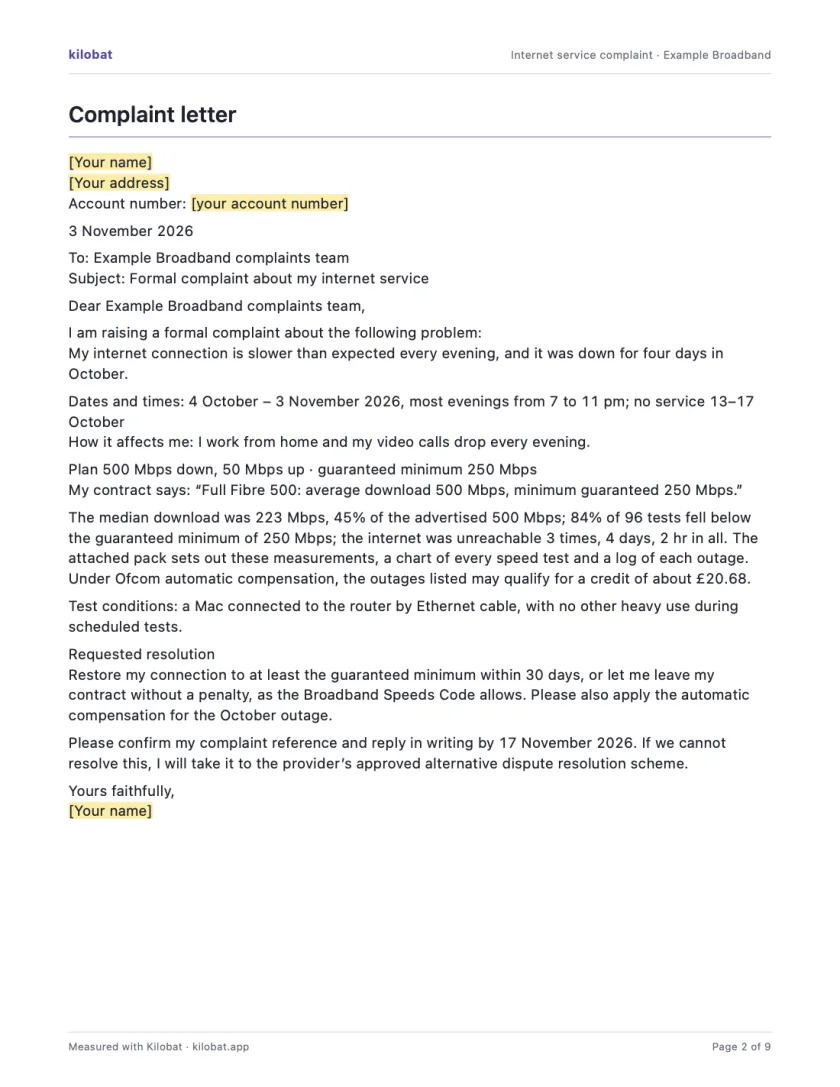
Include the plan wording, dates, test conditions, previous references and the specific outcome you want. Ask for a written response.
For the local escalation route and conditions, follow the Germany complaint guide.
Applies to: Speedport Smart 4 (Typ A) with firmware 010139.5.x (menus as of 2026), and the Smart 4 family with the same interface. The interface is in German; labels are given with an English gloss. Speedport 7: MeinMagenta app only.
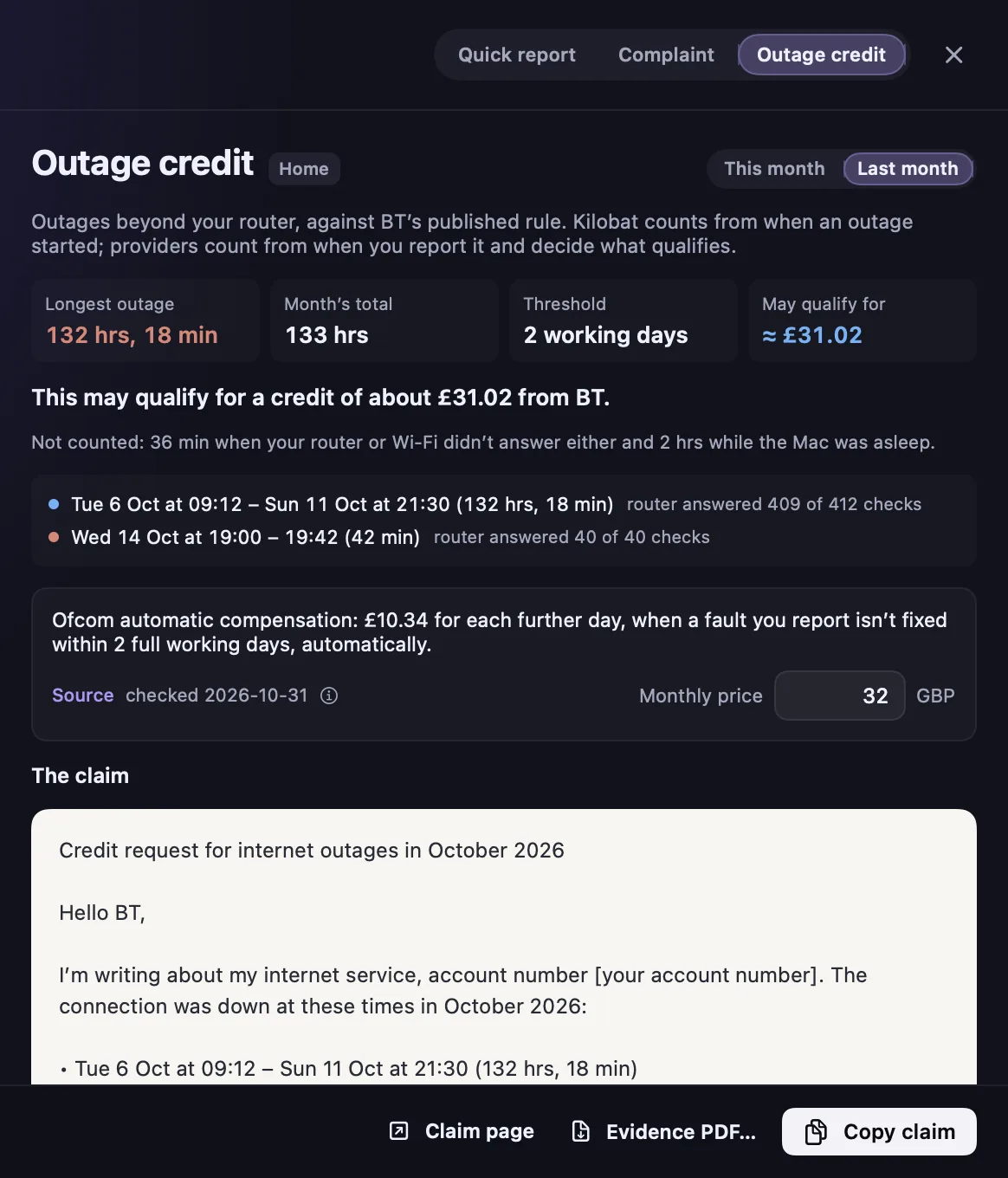
Deutsche Telekom may owe you a credit for an outage.
If a reported fault isn't fixed within two calendar days, you can claim for each further day of complete outage: €5 or 10% of the monthly price on days 3 and 4, then €10 or 20%, whichever is higher.
- Conditions
- For contracts with a fixed monthly price. Not owed when you caused the fault, or for force majeure and legally ordered measures.
Kilobat adds up the month’s outages on Deutsche Telekom’s side of your router, never your Wi-Fi and never time your Mac was asleep, checks them against the rule and drafts the claim. Pro
Send Deutsche Telekom a complaint it can investigate.
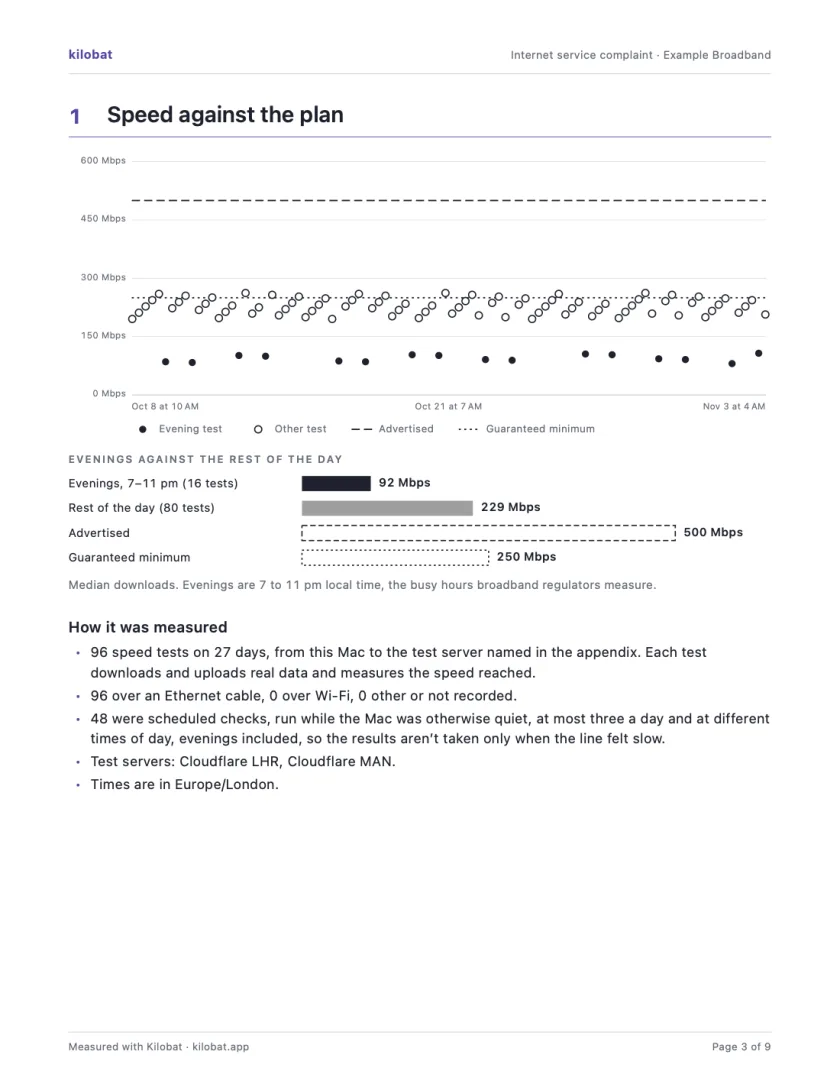
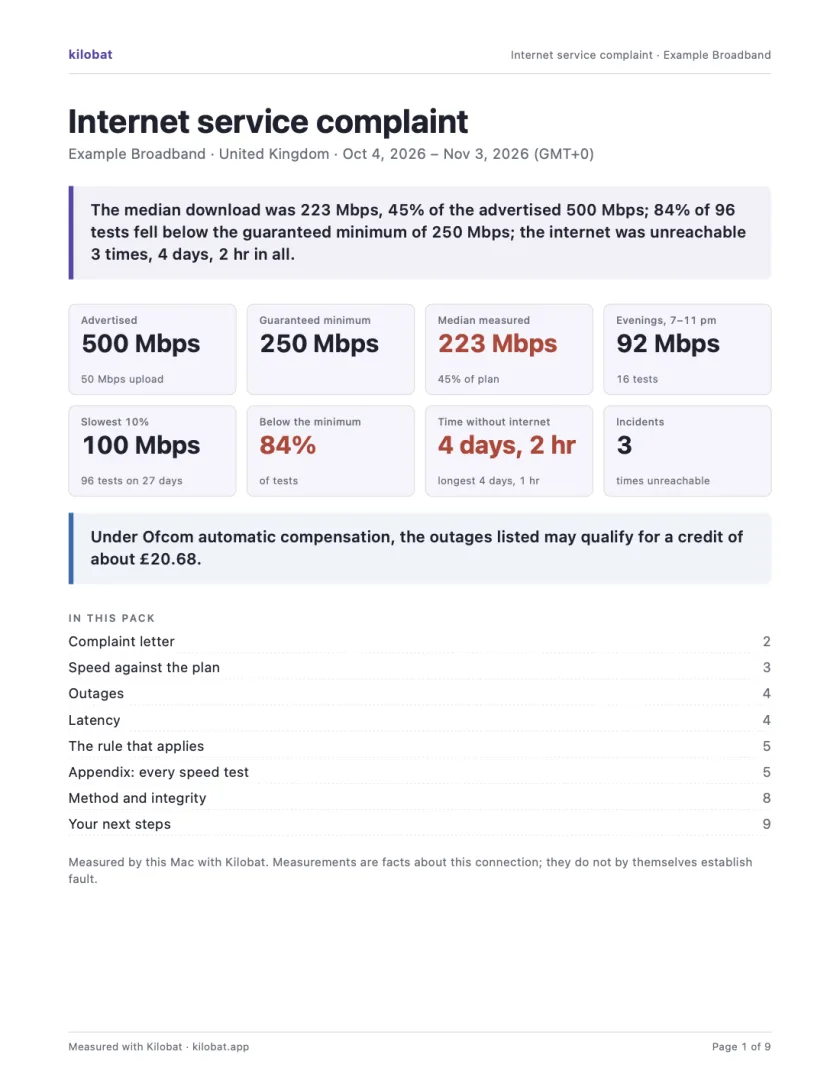
In Kilobat’s Health, click Report… and the Complaint tab takes you through four steps: the problem, your evidence, your request and a review. Then Kilobat Pro builds one PDF: a summary, a letter ready to send, your speed against your plan, every outage and the rule that applies, saved beside the evidence file it came from.
- Measured facts stay separate from the contract figures you type in.
- Strengthen your case lists what’s still missing: evening tests, scheduled checks, a test over a cable.
- Edit the evidence text before export; what you remove stays removed.
- Nothing goes to Deutsche Telekom automatically. You send it through its official channel.
No Pro? The complaint letter template is free, and so is Kilobat’s Quick report.
The escalation route in Germany
- 1
Report the fault to Deutsche Telekom
Use the official support channel, not social media, and note the date, time and reference.
- 2
Make a formal complaint
Ask for a complaint reference and a written response. Attach the plan wording, your tests and the outcome you want.
- 3
Slow internet in Germany: prove underperformance and request a price reduction
For a formal speed claim in Germany, use the Bundesnetzagentur’s official measurement procedure. Ordinary speed tests help diagnose the problem but do not replace its protocol.
Questions
Is Deutsche Telekom down right now?
Check Deutsche Telekom’s own outage tools first. Sign in and click Übersicht › Status (Overview › Status) for the main status information. Click Internet › IP-Adressinformationen for your public IPv4 and IPv6 addresses. Click System › System-Meldungen (System messages) for the event log. Tick Ausführliche System-Meldungen erfassen for more detail, and Liste exportieren to save it. If there is no outage, compare Wi-Fi with a wired connection before you call: a fault inside your home isn’t Deutsche Telekom’s to fix.
Is it Deutsche Telekom or my Wi-Fi?
Test the same Mac on Wi-Fi and plugged into the Speedport with an Ethernet cable, then again at a quieter time. If the wired result is fine, the problem is inside your home: signal, a crowded channel or the Speedport. If the wired result is slow too, especially at the same hours every day, it is more likely the line or Deutsche Telekom’s network. Kilobat checks Wi-Fi, router, internet and DNS in turn and names the link that failed.
How do I complain to Deutsche Telekom?
Use Deutsche Telekom’s official support to report the fault. Request a formal complaint reference if it remains unresolved. Include the plan wording, dates, test conditions, previous references and the specific outcome you want. Ask for a written response. For the local escalation route and conditions, follow the Germany complaint guide.
Does Deutsche Telekom pay compensation for outages?
If a reported fault isn't fixed within two calendar days, you can claim for each further day of complete outage: €5 or 10% of the monthly price on days 3 and 4, then €10 or 20%, whichever is higher. Ask your provider for it after reporting the fault, citing § 58 Abs. 3 TKG.
Where can I escalate a complaint about Deutsche Telekom?
For a formal speed claim in Germany, use the Bundesnetzagentur’s official measurement procedure. Ordinary speed tests help diagnose the problem but do not replace its protocol. See Slow internet in Germany: prove underperformance and request a price reduction.
What evidence should I send Deutsche Telekom?
The plan wording (the advertised speed, and any guaranteed minimum), the dates and times of the problem, repeatable tests with how you tested (a test over an Ethernet cable carries more weight than Wi-Fi), tests in the evening as well as at quiet times, previous complaint references, and the outcome you want. Kilobat’s free Quick report covers the measurements; Kilobat Pro’s complaint pack turns them into one PDF with a letter ready to send, and says what evidence is still missing.
More internet providers
 Comcast Xfinity404 public complaints in 30 days · United StatesComcast Xfinity help →
 Spectrum370 public complaints in 30 days · United StatesSpectrum help →
 AT&T285 public complaints in 30 days · United StatesAT&T help →
 Verizon222 public complaints in 30 days · United StatesVerizon help →
 T-Mobile161 public complaints in 30 days · United StatesT-Mobile help →
 Virgin Media125 public complaints in 30 days · United KingdomVirgin Media help →
Sources
- Telekom Hilfe: Wie komme ich ins Konfigurationsmenü meines Speedport Routers?
- Telekom: Bedienungsanleitung Speedport Smart 4 Typ A (PDF)
- Telekom: Firmware-Änderungen Speedport Smart 4 Typ A (PDF)
- Telekom: Anleitung Firmware-Update Speedport Smart 4
- Telekom: Kurzanleitung Speedport Smart 4
- Deutsche Telekom: claim or compensation information
- Bundesnetzagentur: fixed and mobile speed evidence
- Breitbandmessung: Festnetz-Check proof procedure
- Breitbandmessung: mobile proof procedure
- Bundesnetzagentur: ruling 35/2026 on mobile internet speeds
- Bundesnetzagentur: fixed-line measurement instructions
- § 58 TKG Entschädigung (outage credit rule)
Checked on 3 November 2026.
Know when it’s Deutsche Telekom, and prove it.
brew install seifip/kilobat/kilobat