Internet provider · Connectivity hell
Verizon
The speed on the bill and the speed in the room have never met.
Public Wi-Fi complaints
As of 5 November 2026. The chart shows complaints per full UTC day since tracking began. See how this is counted.
Public complaints
In their own words
Examples behind the count. The wall moves on its own; hover, focus or touch it to pause.
Practical help
Check Verizon, then make a case
Start with the provider’s own equipment and outage checks. Save your plan wording, repeatable measurements and support reference before asking for an investigation.
Verizon Router slow internet in United States: tests, evidence and complaints
Applies to: Verizon Router CR1000A and CR1000B, and Fios Router G3100, per Verizon’s user guides and support pages (menus as of 2026), the Verizon Home app and My Verizon. · Checked 3 November 2026.
Check your Verizon Router
These checks apply to Verizon Router. Check the model before following its menus.
Sign in and open System › System Status for the internet (WAN) and local network status.
For logs, click Advanced, then Diagnostics & Monitoring › System Logging.
Use the links at the top for the WAN, security or firewall logs.
In the Verizon Home app, tap Speed test under Quick actions to test the router’s speed.
Separate the service from your home Wi-Fi
For the exact settings and supported equipment, see the Verizon Router guide.
Do not factory-reset the equipment as a first step. A reset can erase service settings and interrupt phone service.
Compare a wired connection to the router with Wi-Fi on the same device.
Repeat the same test server during the slowdown and at a quieter time.
Record download, upload, latency and whether another household device was using the connection.
How to complain to Verizon
Use Verizon’s official support to report the fault. Request a formal complaint reference if it remains unresolved.
Include the plan wording, dates, test conditions, previous references and the specific outcome you want. Ask for a written response.
For the local escalation route and conditions, follow the United States complaint guide.
Collect the evidence with Kilobat
On a Mac, Kilobat can record connection checks and produce a support report. Review the report and add your test conditions before sharing.
The basic report export is free. Kilobat Pro’s complaint wizard helps assemble your evidence, impact and requested resolution into a draft you review and send.
Measurements cover this Mac while monitoring ran. They cannot prove whole-home uptime, establish provider fault or replace a required official measurement procedure.
Provider sources (9)
- Verizon: Verizon Router CR1000A user guide (PDF, 2025) ↗
- Verizon: Verizon Router CR1000B user guide (PDF) ↗
- Verizon: Fios Router G3100 user guide (PDF) ↗
- Verizon Support: Verizon Router FAQs ↗
- Verizon Support: Fios Router FAQs ↗
- Verizon Support: Verizon Router – Sign in to the Admin WebGUI ↗
- Verizon Support: Verizon Router – Restart Device ↗
- Verizon Support: Verizon Home app FAQs ↗
- Verizon Support: Service outage information ↗
Verizon Internet Gateway (5G Home and LTE Home) slow internet in United States: tests, evidence and complaints
Applies to: Verizon Internet Gateway ARC-XCI55AX (software 3.4.0.20), with notes for ASK-NCQ1338 and WNC-CR200A, and the Verizon Home app as of 2026. The older 5G Home Router opens at my.router and has a different menu. · Checked 3 November 2026.
Check your Verizon Internet Gateway (5G Home and LTE Home)
These checks apply to Verizon Internet Gateway (5G Home and LTE Home). Check the model before following its menus.
Sign in and open Advanced › System › System Status for the LAN and WAN status and firmware.
Open System Logging under Diagnostics & Monitoring for recent activity.
Click the links at the top for the security, firewall, WAN DHCP and LAN DHCP logs.
Click Options to choose the time span, then Refresh to update the log.
Separate the service from your home Wi-Fi
For the exact settings and supported equipment, see the Verizon Internet Gateway (5G Home and LTE Home) guide.
Do not factory-reset the equipment as a first step. A reset can erase service settings and interrupt phone service.
Compare a wired connection to the router with Wi-Fi on the same device.
Repeat the same test server during the slowdown and at a quieter time.
Record download, upload, latency and whether another household device was using the connection.
How to complain to Verizon
Use Verizon’s official support to report the fault. Request a formal complaint reference if it remains unresolved.
Include the plan wording, dates, test conditions, previous references and the specific outcome you want. Ask for a written response.
For the local escalation route and conditions, follow the United States complaint guide.
Collect the evidence with Kilobat
On a Mac, Kilobat can record connection checks and produce a support report. Review the report and add your test conditions before sharing.
The basic report export is free. Kilobat Pro’s complaint wizard helps assemble your evidence, impact and requested resolution into a draft you review and send.
Measurements cover this Mac while monitoring ran. They cannot prove whole-home uptime, establish provider fault or replace a required official measurement procedure.
Provider sources (11)
- Verizon Support: Verizon Internet Gateway, access admin page ↗
- Verizon Internet Gateway (ARC-XCI55AX) user guide (PDF) ↗
- Verizon Support: Verizon Home app, restart gateway ↗
- Verizon Support: Verizon Internet Gateway, soft reset ↗
- Verizon Support: Verizon Internet Gateway (ARC-XCI55AX) software update ↗
- Verizon Support: Verizon Internet Gateway, view software version ↗
- Verizon Support: Verizon Internet Gateway, view connected devices ↗
- Verizon Support: Verizon Internet Gateway, configure IP Passthrough / bridge mode ↗
- Verizon Support: 5G Home Internet, add Wi-Fi Extender via My Verizon app ↗
- Verizon Support: 5G Home Router, sign in to the Admin WebGUI ↗
- Verizon Support: Verizon Home app FAQs ↗
Your rights and escalation route
What to do if the provider does not fix it
Rules depend on where the service is supplied and on your agreement. These jurisdiction guides explain the documented process and link to official sources.
Slow internet in the US: build a speed complaint for your ISP and the FCC
Start with your own service agreement and repeatable measurements. The FCC accepts internet speed and latency complaints; a complaint is not a guaranteed refund.
Save the plan and broadband label
Keep the plan name, advertised and typical speed wording, price and relevant terms. Record when and where you obtained the information.
Do not turn a typical speed into a guaranteed minimum unless the agreement actually makes that commitment.
Ask your ISP for a specific investigation
Compare Ethernet and Wi-Fi on the same device.
Repeat the test when the problem occurs and during a quieter period.
Ask the ISP to check the provisioned plan, line signal and local faults.
Save the ticket number, promised follow-up and written response.
Choose the matching FCC complaint issue
The FCC internet form includes speed issues, including advertised-speed and latency concerns. Other categories cover billing, equipment and availability.
Describe your own experience and attach relevant evidence. State law, service terms and the circumstances affect possible remedies.
Prepare your complaint
Use the complaint template to state the problem, evidence and requested resolution. Keep the tone factual.
You can collect evidence without Kilobat. If you use a Kilobat report, review it before sharing and add your test conditions.
Still stuck?
You can ask for help at ping@kilobat.app. Send your symptoms and reviewed test results, with or without Kilobat.
Official sources
Find the failing hop
Give support something they can investigate.
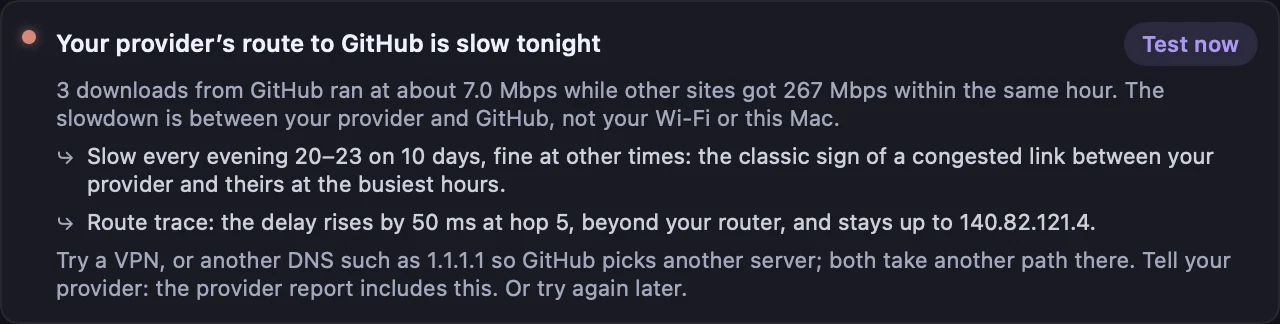
When a connection fails, Kilobat checks your Mac’s Wi-Fi, router, internet access and DNS in turn. That helps separate a local signal or router problem from a fault farther along the route.
Keep dated results and test conditions. The free support report helps you explain what happened. Kilobat Pro can assemble a reviewed PDF complaint pack with measurements, an incident timeline, your plan details and the remedy you request.
You decide what to include and send it yourself. Measurements from one Mac cannot establish service-wide uptime or prove operator fault.
PDF dossier · reviewed by you
Evidence you can send