Provider box · auひかり
auひかり home gateway login, restart, firmware and UPnP
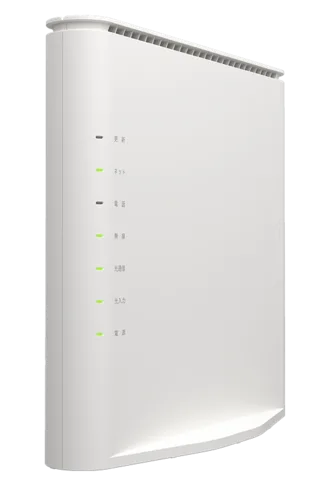
The ホームゲートウェイ (home gateway) is the router KDDI rents out with auひかり ホーム: the Wi-Fi 6E Aterm BL3000HM, made by NEC Platforms, for 10ギガ and 5ギガ, and the BL1500HM for 1ギガ. You manage it in a browser through クイック設定Web (Quick settings web).
- Sign in
192.168.0.1- Password
- There is no user name. The first time, you sign in with the eight-character クイック設定Webパスワード (Web PW) on the label on the gateway’s side, then choose your own. The Wi-Fi names and 13-character key are on the same label.
- Models
- BL3000HM, BL1500HM
Sign in to the auひかり ホームゲートウェイ
Connect your Mac to the gateway by Ethernet or Wi-Fi.
Open
http://192.168.0.1/in the browser.On 接続端末 情報画面 (Connected device info), click ログイン画面へ (To login screen).
The first time, enter the label’s Web PW, click 次へ (Next), then set a new password.
Enter your password and click ログイン (Log in) to reach the home screen.
Several wrong passwords in a row lock you out for a while. Forgotten it? Unplug the gateway for about 10 seconds, then hold the 初期化 (Reset) button while plugging it back in. Let go when the lights flash green three times. This erases every setting.
Restart it properly
On the home screen, open ホームゲートウェイ詳細設定 (Home gateway advanced settings).
Click 4.メンテナンス › 再起動 (Maintenance › Restart).
Click 再起動 (Restart), then OK in each of the two dialogs.
Click 保存 (Save) before restarting, or unsaved changes are lost. A restart cuts every auひかり電話 call.
Without the browser
Unplug the gateway’s power adapter.
Wait at least 10 seconds, then plug it back in.
Schedule a restart
There is no scheduled restart. Automatic firmware updates restart the gateway on their own.
Update the firmware
Sign in to クイック設定Web.
Under 基本情報 (Basic info), click ここから確認 (Check here).
Read ファームウェアバージョン (Firmware version) under 装置情報 (Device info).
While an update installs, the power light is orange and internet, phone and TV are down for about five minutes. Calls in progress aren’t cut. Don’t switch it off.
Install an update yourself
There is no manual update. The gateway checks KDDI’s servers regularly and installs new firmware itself.
See connected devices
On the home screen, open ネットワーク診断 (Network diagnosis).
Click 接続状態表示 (Connection status). A network map shows the gateway, mesh repeaters and devices.
Set 表示形式 (Display) to 接続中の端末のみ表示 (Connected devices only) or すべての端末を表示 (All devices).
Click a device to open 端末ごとの設定 (Per-device settings).
Register a ニックネーム (nickname) for each device to tell them apart. Per-device settings may not work on iPhones and other devices using private Wi-Fi addresses; the guide suggests turning that off on the device.
UPnP and port forwarding
Open ホームゲートウェイ詳細設定 (Home gateway advanced settings).
Click 2.ネットワーク設定 › その他の設定 (Network settings › Other settings).
Under UPnP設定, set UPnP機能 (UPnP) to ON or OFF and click 設定 (Apply).
Click 保存 (Save).
UPnP is on from the factory. It lets any app on your network open ports without asking, which malware can use too. Turn it off if nothing you use needs it.
See the ports apps have opened
Open 基本情報 (Basic info).
Check 現在UPnP利用中の端末リスト (Devices using UPnP) for each device’s IP address and ports.
NAT-PMP
The feature guide documents no NAT-PMP.
Prioritise calls and gaming
The gateway has no QoS or device priority setting; its feature list doesn’t include one.
2.4 and 5 GHz, and the channel
By default the gateway offers one name, auhikari-xxxxxx, across 6, 5 and 2.4 GHz with band steering, plus separate names per band ending in -e, -a and -g. Band steering is tied to mesh: turning off メッシュWi-Fi機能 turns it off too. Built-in Wi-Fi is a paid option unless a discount covers it.
Open ホームゲートウェイ詳細設定 › 1.無線LAN設定 (Wi-Fi settings).
Click 無線LAN詳細設定(5GHz), or the 2.4GHz or 6GHz page.
Set チャネル自動選択 (Automatic channel) to OFF.
Pick a channel in 使用チャネル (Channel), then click 設定 (Apply).
Click 保存 (Save). Wi-Fi devices may drop and reconnect.
If a Mac or PC can’t connect, the guide suggests setting 11axモード (11ax mode) to OFF on that band. On 5 GHz, radar detection can move the gateway to another channel.
See nearby networks
Open ネットワーク診断 › 周辺状況 (Nearby networks).
Choose a band in 表示周波数 (Band) to see up to 20 nearby networks and how busy each channel is.
Mesh: which node a device uses
The BL3000HM is a mesh main unit, with メッシュWi-Fi機能 (Mesh Wi-Fi) on from the factory. KDDI’s おうちどこでもWi-Fi option adds a repeater set. Up to nine repeaters fit, at most two in a chain.
Place the repeater about a metre from the gateway and switch it on.
Start WPS on the repeater as its manual describes.
Hold the gateway’s メッシュ (Mesh) button until the 無線 (Wireless) light blinks orange, then let go.
The 無線 light stays orange for about 10 seconds; setup is done when it turns green.
Mesh only works with WPA2-PSK(AES)/WPA3-SAE(AES) or WPA3-SAE(AES) security and with SSID stealth off. Don’t add a second mesh main unit. A repeater can also join by Ethernet: cable the gateway’s LAN port to its WAN port.
Guest network
The セカンダリSSID (secondary network, SSID3) is meant for visitors. It’s off from the factory and isolated by ネットワーク分離機能 (Network separation): its devices can’t reach クイック設定Web, wired devices or other Wi-Fi devices.
Open ホームゲートウェイ詳細設定 › 1.無線LAN設定 › 無線LAN詳細設定(5GHz), or the 2.4GHz or 6GHz page.
In 対象ネットワークを選択 (Choose network), select SSID3(セカンダリ).
Set 無線機能 (Wireless) to ON and click 設定 (Apply).
Click 保存 (Save). The page shows the network’s key, ending in
-aw,-gwor-ewby band.
The secondary network uses WPA3 only by default. If an older device can’t join, switch its 暗号化モード (Security) to WPA2-PSK(AES)/WPA3-SAE(AES).
DNS settings
You can’t choose the DNS servers the gateway uses or hands out. It always acts as a proxy for the provider’s DNS (proxyDNS), and IPアドレスとDHCPサーバ設定 has no DNS field. Set DNS on the Mac instead.
Connection status and logs
Open 基本情報 (Basic info) for the lights, firmware, WAN address, DNS servers and Wi-Fi channels in use.
Open ネットワーク診断 › ログの表示 (Show log) for the device log; ファイルへ保存 (Save to file) downloads it.
ホームゲートウェイ詳細設定 › 4.メンテナンス › PINGテスト (Ping test) checks whether an address answers from the gateway.
The lights help too: a green ネット (Internet) light means the connection is up, and a green 光通信 (Optical) light means the fibre line has authenticated.
Manuals and downloads
- au: Aterm BL3000HM 取扱説明書 (manual, PDF)
- NEC Platforms: Aterm BL3000HM 機能詳細ガイド (feature guide)
- au: HGW BL1500HM support and manuals
- KDDI: BL1500HM 機能詳細ガイド (feature guide)
Links go to the maker’s own pages.
Questions
Is there a default password for 192.168.0.1?
Only for the first login: the eight-character Web PW on the side label. You must set your own straight away. If nobody remembers it, reset the gateway.
Which home gateway do I have?
Since October 2022, new auひかり ホーム 10ギガ and 5ギガ lines get the BL3000HM, which has the ONU built in; ホーム 1ギガ gets the BL1500HM with a separate ONU.
Why won’t my laptop see the Wi-Fi?
Some older Wi-Fi adapters can’t join while 11ax is on. Set 11axモード to OFF on that band’s page, or join the per-band network instead of the band-steering one.
Sources
- au: クイック設定Web(BL3000HMをご利用の方)
- au: BL3000HM ファームウェア情報 (firmware updates)
- au: Aterm BL3000HM 取扱説明書 (manual, PDF)
- au: auひかり ホーム 新ホームゲートウェイのご提供開始について (2022)
- NEC Platforms: BL3000HM 機能詳細ガイド, ホームゲートウェイ詳細設定
- NEC Platforms: BL3000HM 機能詳細ガイド, 再起動
- NEC Platforms: BL3000HM 機能詳細ガイド, その他の設定 (UPnP)
- NEC Platforms: BL3000HM 機能詳細ガイド, 基本情報
- NEC Platforms: BL3000HM 機能詳細ガイド, 接続状態表示
- NEC Platforms: BL3000HM 機能詳細ガイド, 無線LAN詳細設定(5GHz)
- NEC Platforms: BL3000HM 機能詳細ガイド, メッシュ中継機を接続する
- NEC Platforms: BL3000HM 機能詳細ガイド, セカンダリSSIDに接続する
- KDDI: BL1500HM 機能詳細ガイド, UPnP設定
Checked on 1 November 2026.
See what your router can’t tell you
Kilobat is a Mac menu-bar app that watches the network from your side: which app is using it, whether the Wi-Fi, the router or the provider is slow, and why a call froze.
brew install seifip/kilobat/kilobat