Provider box · Verizon 5G Home Internet
Verizon 5G Home Internet Gateway login, restart, port forwarding and UPnP
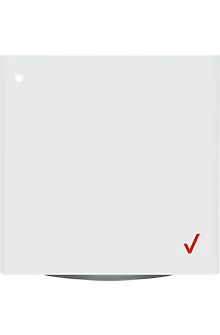
The Verizon Internet Gateway is the 5G or LTE modem and Wi-Fi router Verizon supplies with 5G Home and LTE Home Internet. Everyday tasks are in the Verizon Home app; the full settings are in the browser at mynetworksettings.com.
- Sign in
mynetworksettings.comor192.168.1.1- App
- Verizon Home app (iOS and Android), signed in with your My Verizon login
- Password
- The admin password is printed next to Password on the label on the bottom of the gateway, with the default Wi-Fi name and password. You can change it after signing in.
- Models
- Verizon Internet Gateway ARC-XCI55AX, ASK-NCQ1338, ASK-NCQ1338FA, WNC-CR200A, ASK-NCM1100 (LTE Home), 5G Home Router (2nd gen)
Sign in to the Verizon Internet Gateway (5G Home and LTE Home)
Connect your Mac to the gateway by Wi-Fi or Ethernet.
Open
mynetworksettings.comin a browser.If it doesn’t load, use
https://192.168.1.1(ARC-XCI55AX, WNC-CR200A) orhttps://192.168.0.1(ASK-NCQ1338).If the browser warns that the connection is not private, click Advanced, then Proceed to 192.168.X.X (unsafe).
Enter the admin password and click Log In.
The warning appears because the gateway uses its own certificate. On the older 5G Home Router, open my.router or 192.168.0.1; if you forgot its password, click Forgot Admin Password? and answer a security question.
Restart it properly
Open the Verizon Home app and, under Connections, tap Equipment.
Tap Restart gateway, then tap it twice more to confirm.
Allow up to 10 minutes for the gateway to restart.
Holding the reset button for 3 seconds or more is a factory reset, not a restart: it erases the Wi-Fi name, passwords and every setting.
Restart by hand
Pull the power adapter out of the gateway’s DC socket.
Wait about 10 seconds, then plug it back in.
Wait up to 5 minutes for the light to turn solid white.
In the admin page
Sign in and open Advanced › System › Reboot Router.
Click Reboot Device. It takes about a minute.
Verizon’s guide says to use this only when Verizon support asks you to; the app or a power cycle is the usual way.
Schedule a restart
Verizon documents no scheduled restart.
Update the firmware
Verizon publishes software updates for each gateway model and lists them on a support page. A fast-blinking white light means an update is in progress.
Sign in at
mynetworksettings.comand click Status.Scroll to the Modem section and read Firmware Version.
Compare it with the newest version on Verizon’s software update page for your model.
For the ARC-XCI55AX, System Update 7 (3.4.0.20, December 2025) is the latest listed. Verizon’s pages don’t describe a way to install an update yourself, so leave the gateway powered on.
See connected devices
Sign in and click Devices, then Devices again.
The list shows online and offline devices, how they connect and their parental controls.
Click Block/Allow next to a device to cut or restore its internet access.
Click the settings icon to rename it or see its MAC address, IP address and access point.
The Verizon Home app also lists devices on your Wi-Fi and can group them for parental controls.
UPnP and port forwarding
The gateway supports UPnP for automatic port forwarding. Verizon’s guide doesn’t say whether it is on by default.
Sign in and open Advanced › Devices › Universal Plug & Play.
Tick UPnP Enabled.
Tick Enable Automatic Cleanup of Old Unused UPnP Services to remove stale rules every five minutes.
Click Apply changes.
With UPnP on, any app or device on your network, including malware, can open ports without asking. Turn it on only if a game or call app needs it, and keep the cleanup option ticked.
Port forwarding
Open Advanced › Security & Firewall › Port Forwarding.
Enter the application name, ports, destination device and protocol.
Choose Always or User Defined under Schedule.
Click Add to list, then Apply Changes.
NAT-PMP
Verizon’s docs don’t mention NAT-PMP.
Prioritise calls and gaming
Verizon documents no device priority or QoS rules. The only QoS setting is Wi-Fi QoS (WMM) under the primary network’s advanced Wi-Fi settings, which prioritises voice, video and audio streams over Wi-Fi.
2.4 and 5 GHz, and the channel
Sign in and open Advanced › Wi-Fi › Radio Management.
Click Scan to check how busy each channel is; a higher Channel Score means less congestion.
On the 2.4 or 5 GHz Channel Settings page, pick a channel or keep Auto.
Under Settings, tick Keep my channel selection during power cycle and click Apply Changes.
Some streaming devices can’t use DFS channels on 5 GHz. Untick Enable DFS channels during channel scan under Settings if one won’t connect.
A separate 2.4 GHz network
Verizon’s guide doesn’t document splitting the primary network into two names. Instead, the gateway has a separate IoT network on 2.4 GHz for smart home devices, which you can turn on or off in the Verizon Home app.
Mesh: which node a device uses
Verizon Wi-Fi Extenders, such as the CE1000A and E3200, pair with the gateway to extend its network.
Open the My Verizon app and tap the Home tab.
Under Home devices, tap your gateway, then Setup Extender.
Select your extender, tap Begin setup and follow the prompts.
To see each extender’s settings, open Advanced › System › System Status in the admin page.
You can also pair with WPS: press the WPS button on the gateway, then on the extender, within range.
Guest network
The guest network keeps visitors away from your devices and shared files. It is off from the factory; its default name is your Wi-Fi name followed by -Guest.
Sign in and open Basic › Wi-Fi › Guest Network.
Move the selector to on.
Keep or change the name and password.
Click Apply Changes.
Verizon advises against a guest network without a password. The Verizon Home app can also manage the guest network and share its details.
DNS settings
The DNS Server page only manages local host names. Verizon documents no way to set your own upstream DNS servers on the gateway, so set DNS on the Mac, or use your own router with IP Passthrough.
Connection status and logs
Sign in and open Advanced › System › System Status for the LAN and WAN status and firmware.
Open System Logging under Diagnostics & Monitoring for recent activity.
Click the links at the top for the security, firewall, WAN DHCP and LAN DHCP logs.
Click Options to choose the time span, then Refresh to update the log.
A solid white light means online. To use your own router, turn on IP Passthrough under Advanced › Network Settings › Network Connections › Network (Home/Office) › Settings; Wi-Fi then switches off and only the LAN2 port works.
Manuals and downloads
- Verizon Internet Gateway (ARC-XCI55AX) user guide (PDF)
- Verizon Support: Verizon Internet Gateway (ARC-XCI55AX)
- Verizon Support: 5G Home Internet support overview
Links go to the maker’s own pages.
Questions
Why does mynetworksettings.com show a privacy warning?
The gateway uses its own certificate. Verizon says to click Advanced, then Proceed to 192.168.X.X (unsafe), to reach the sign-in page.
Can I use my own router?
Yes. Turn on IP Passthrough in the admin page and plug your router into the LAN2 port. The gateway’s Wi-Fi and LAN1 port stop working while it is on.
Where is the admin password?
On the label on the bottom of the gateway, next to Password.
Sources
- Verizon Support: Verizon Internet Gateway, access admin page
- Verizon Internet Gateway (ARC-XCI55AX) user guide (PDF)
- Verizon Support: Verizon Home app, restart gateway
- Verizon Support: Verizon Internet Gateway, soft reset
- Verizon Support: Verizon Internet Gateway (ARC-XCI55AX) software update
- Verizon Support: Verizon Internet Gateway, view software version
- Verizon Support: Verizon Internet Gateway, view connected devices
- Verizon Support: Verizon Internet Gateway, configure IP Passthrough / bridge mode
- Verizon Support: 5G Home Internet, add Wi-Fi Extender via My Verizon app
- Verizon Support: 5G Home Router, sign in to the Admin WebGUI
- Verizon Support: Verizon Home app FAQs
Checked on 1 November 2026.
See what your router can’t tell you
Kilobat is a Mac menu-bar app that watches the network from your side: which app is using it, whether the Wi-Fi, the router or the provider is slow, and why a call froze.
brew install seifip/kilobat/kilobat