Provider box · SFR
SFR Box login, restart, updates and UPnP
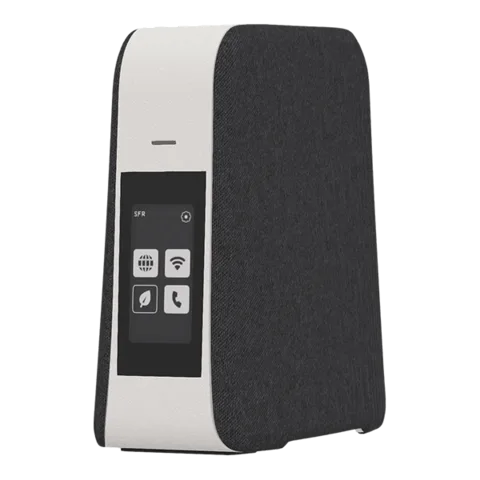
The SFR Box is the box SFR and RED by SFR supply in France. You manage it in a browser at 192.168.1.1 (Box 8 and 8X) or http://mabox (Box 10 and 10+), and its Wi-Fi in the SFR & Moi app.
- Sign in
192.168.1.1ormonmodem (Box 8); http://mabox (Box 10 and 10+)- App
- SFR & Moi, or RED & Moi for RED customers (iOS and Android)
- Password
- The user name is
adminand the password is the Wi-Fi key, both on the label under the box. On a Box 10 or 10+ the Wi-Fi key also shows on the front screen. - Models
- SFR Box 8, SFR Box 8X, SFR Box 8 Fibre, SFR Box 10+, SFR Box 10
Sign in to the SFR Box
The interface only works from inside your home. The Fibre password SFR sends by SMS is only for first set-up, not for signing in.
Factory default. SFR’s documented default is admin with the Wi-Fi key from the label as the password. You can change it in the interface.
Connect your Mac to the box by Wi-Fi or Ethernet.
Open
https://192.168.1.1on a Box 8, orhttp://maboxon a Box 10.On a Box 8, hold the WPS button for about 5 seconds, then click Valider (Confirm).
On a Box 10, click Connexion (Sign in), then tap Confirmer on the box’s screen before the countdown ends.
Or sign in with
adminand the Wi-Fi key from the label.
Changed and forgotten your Wi-Fi key? A reset brings back the key on the label, but erases your settings. On a Box 10 or 10+, SFR says to use the Reset button only when its customer service asks.
Restart it properly
SFR suggests restarting the box when several devices are slow or offline. RED by SFR documents these steps for the Box 8.
Unplug the box’s power adapter from the socket.
Wait 2 minutes.
Plug it back in. A Box 8 is ready when its Internet light is steady; a Box 10’s status light turns steady white.
Don’t press the Reset button to restart: it returns the box to factory settings. On a Box 10 or 10+ it also means re-entering the Fibre password before internet works again.
Schedule a restart
There is no scheduled restart. On a Box 10 or 10+, SFR & Moi can schedule Eco mode or Wi-Fi off, but not a restart.
Update the firmware
There is no manual update. SFR updates the box itself, and it may restart to install an update. On a Box 10 or 10+, a flashing purple light means an update is running: don’t touch the box. SFR’s help pages don’t say where to read the software version.
See connected devices
Open SFR & Moi and tap Smart WiFi, then Ma Box (My box).
See devices connected now or on previous days, with their connection type, IP and MAC address.
Use the filter to see each device’s speed and Wi-Fi signal strength.
In the Box 8 interface, open LAN › Equipements for wired devices, or WiFi › Equipements for Wi-Fi.
UPnP and port forwarding
SFR says most devices configure the Box 8 themselves through UPnP or a similar protocol, and recommends that over manual set-up. SFR’s help pages document no UPnP switch or status page.
If automatic set-up fails, open Sécurité › Accès (Security › Access) in the Box 8 interface.
Under Réseau v4 › Redirection des ports (Port forwarding), click Créer une règle (Create a rule).
Name the rule, pick the device’s IP, the protocol and the ports, then enable it.
UPnP lets any app or device on your network open ports in the box without asking, which malware can abuse too. Prefer a fixed port forward for anything you expose, and close forwards you no longer need.
Fixed address first
Give the device a fixed address under LAN › Baux statique (Static leases) before you forward ports to it.
NAT-PMP
SFR documents no NAT-PMP setting.
Prioritise calls and gaming
SFR’s help pages document no QoS or device-priority setting on the Box 8 or Box 10.
2.4 and 5 GHz, and the channel
Smart WiFi, on by default, keeps each device on the best band and access point. SFR recommends leaving it on.
On a Box 8, open the interface and click the WiFi section on the left.
Click Editer (Edit), check the network name and key, and keep Smart WiFi on ON.
Click Sauvegarder (Save).
Older devices
A device that can’t join the Box 8’s Wi-Fi 6 may need new drivers. As a stopgap, turn off the Wi-Fi 6 switch in the WiFi section. On a Box 10 or 10+, turn on WiFi compatible (Compatible Wi-Fi) in the WiFi section instead.
Change the channel
SFR’s help pages for the Box 8 and Box 10 document no manual channel setting; Smart WiFi chooses it.
Eco mode on the Box 10 and 10+
In SFR & Moi, Gérer mon Smart WiFi › Economie d’énergie de ma Box (Box energy saving) switches Eco mode or schedules it. In Eco mode only the 2.4 GHz band stays on.
Mesh: which node a device uses
SFR’s Smart WiFi repeaters extend a Box 8; the Répéteur WiFi 7 extends a Box 10+. Smart WiFi uses 802.11k, v and r to move devices between box and repeaters.
Open SFR & Moi and tap Gérer mon Smart WiFi (Manage my Smart WiFi).
Tap Installer un répéteur (Install a repeater) and follow the guide.
Place the repeater halfway between the box and the area to cover, where the box’s signal is still good.
Without the app, press WPS on the repeater and then on the box, and wait for a steady white light.
Through thick walls or floors, connect the repeater to the box by Ethernet or powerline instead.
Guest network
Open SFR & Moi and tap Smart WiFi.
Tap Activer / Désactiver le WiFi (Turn Wi-Fi on or off).
Under Activation du WiFi, turn on the Invité (Guest) switch.
To share it, tap Partager mon code WiFi and send the details or a QR code.
Guests get internet on a network separate from yours. On a Box 10 or 10+ you can also turn on WiFi invité in the WiFi section at http://mabox.
DNS settings
SFR’s help pages document no setting for the DNS servers the box hands out. Set DNS on the Mac instead.
Connection status and logs
Open SFR & Moi and tap Lancer le diagnostic de ma box (Run my box diagnosis), or go through Aide (Help).
Pick the service that isn’t working; if needed, the app puts you through to an adviser.
In the Box 8 interface, click WAN; Informations générales shows the box’s public IPv4 and IPv6 addresses.
On a Box 10 or 10+, tap Internet on the front screen to check the connection.
A public IPv4 address starting with 10. means the connection runs over IPv6, which changes how port forwarding works. RED customers run the same diagnosis in RED & Moi under Aide.
Manuals and downloads
- Assistance SFR: SFR Box 8X
- Assistance SFR: SFR Box 10+
- Assistance SFR: SFR Box 10+ specifications
- Assistance RED by SFR: Dépanner ma Box 8
Links go to the maker’s own pages.
Questions
Which password opens the box’s interface?
The user name admin and the Wi-Fi key from the label, unless you changed it. The Fibre password from SFR’s SMS is only for setting up the connection.
Does RED by SFR use the same box?
RED by SFR supplies the SFR Box 8, among others. Its help pages use the same https://192.168.1.1 interface and WPS sign-in; RED customers use RED & Moi instead of SFR & Moi.
Sources
- Assistance SFR: Se connecter à la SFR Box 8/8X pour la première fois
- Assistance SFR: Activer le Smart WiFi SFR (Box 8, login)
- Assistance SFR: Personnaliser la clé WiFi de la box Fibre et SFR Box 8
- Assistance SFR: Personnaliser le WiFi de la SFR Box 10+
- Assistance SFR: Activer le WiFi compatible de la SFR Box 10+
- Assistance SFR: Caractéristiques de la SFR Box 10+
- Assistance SFR: Réinitialiser la SFR Box 10+
- Assistance SFR: Utiliser le mode Eco de la SFR Box 10+
- Assistance SFR: Accéder à distance à un équipement connecté à ma SFR Box 8
- Assistance SFR: Se connecter au WiFi de la SFR Box 8
- Assistance SFR: Les fonctionnalités Smart WiFi de l’appli SFR & Moi
- Assistance SFR: Tout savoir sur le Smart WiFi SFR
- Assistance SFR: Installer le répéteur Smart WiFi SFR
- Assistance SFR: Optimiser le signal WiFi de la SFR Box 8
- Assistance SFR: Connexion Internet lente
- Assistance SFR: Utiliser l’appli SFR & Moi
- Assistance RED by SFR: Dépanner ma Box 8
- Assistance RED by SFR: Personnaliser le WiFi de ma Box 8
- Assistance RED by SFR: Installer ma Box 8
Checked on 1 November 2026.
See what your router can’t tell you
Kilobat is a Mac menu-bar app that watches the network from your side: which app is using it, whether the Wi-Fi, the router or the provider is slow, and why a call froze.
brew install seifip/kilobat/kilobat