Provider box · Orange
Orange Livebox login, restart, updates and UPnP
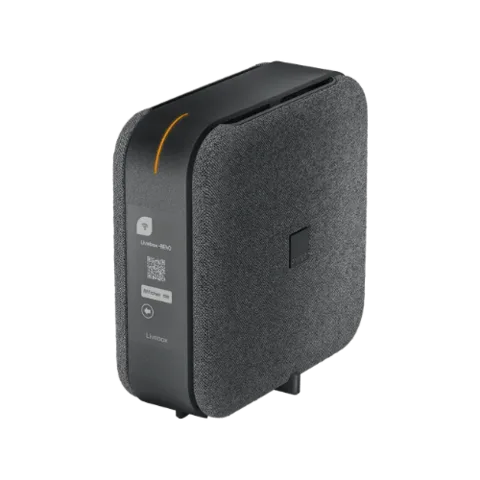
The Livebox is the box Orange and Sosh supply in France. You manage it in a browser at http://livebox/, or remotely through Mon Réseau Local in the Orange et moi app.
- Sign in
liveboxor192.168.1.1- App
- Orange et moi, or MySosh (iOS and Android), through Mon Réseau Local
- Password
- The user name is
admin. Unless you changed it, the password is the first 8 characters, without spaces, of the Wi-Fi security key (clé de sécurité) on the label under the Livebox or on its screen. - Models
- Livebox 7, Livebox 6, Livebox S, Livebox 5
Sign in to the Livebox
Connect your Mac to the Livebox by Wi-Fi or Ethernet, and disconnect any company VPN.
Open
http://livebox/or192.168.1.1in the address bar, not the search box.Type
adminas the user name and enter the password.Click Connexion (Sign in). You land on Administration - Mes Favoris (Administration – My favourites).
Forgotten a password you set? On the sign-in page click Mot de passe oublié (Forgotten password), enter a new one twice and click Enregistrer (Save). Confirm it on the Livebox 6 or 7 screen; on a Livebox 5, press the WPS button instead.
Restart it properly
Orange documents two ways: the power button, or Mon Réseau Local. A restart can take up to 7 minutes and cuts internet, phone and TV meanwhile.
Open Orange et moi, tap Votre Livebox (Your Livebox), then Carte de vos équipements (Device map).
Tap the Livebox circle on the map.
Open Solution de dépannage › Redémarrage (Troubleshooting › Restart).
Tap Redémarrer maintenant (Restart now) and wait.
Don’t press the Reset button to restart: it returns the Livebox to factory settings. If automatic configuration backup is on, your own settings are reapplied after a reset.
With the power button
Switch the Livebox off with its Marche/Arrêt (On/Off) button at the back.
Switch the Orange TV box off too, so it doesn’t lose sync.
Switch the Livebox back on and wait for the light to turn steady orange.
Switch the TV box back on.
Schedule a restart
There is no scheduled restart. Planificateur Wi-Fi et veille (Wi-Fi and standby scheduler) only switches Wi-Fi off or puts the box in standby at set times.
Update the firmware
Open
http://livebox/; the sign-in page shows the software version.Or open Orange et moi, go to the Réseau local (Local network) section and check the version there.
Orange updates the Livebox automatically; there is no manual update. An update takes about three minutes, cuts internet, phone and TV, and ends with an automatic restart. Don’t unplug the box while one is running.
See connected devices
Sign in at
http://livebox/and click the Réseau local (Local network) icon.Open Mes équipements connectés (My connected devices).
Use the Carte (Map) or Liste (List) tab to see connected devices.
Click a device to rename it or set times when it may go online.
Open Historique des connexions (Connection history) for every device that has connected, newest first.
UPnP and port forwarding
The Livebox has UPnP IGD, on by default. Orange’s TV service relies on it, so Orange advises keeping it on.
Sign in at
http://livebox/.Click Paramètres avancés (Advanced settings) at the bottom of the page.
Click Réseau (Network), then the UPnP tab.
Tick or untick Activer le service UPnP IGD (Enable the UPnP IGD service).
Click Enregistrer (Save).
UPnP lets any app on your network open ports in the Livebox firewall without asking, which malware can abuse too. On a Livebox with Orange TV, switching it off can degrade picture quality, remote recording and TV box updates. Without Orange TV, you can leave it off unless a game or app needs it.
NAT-PMP
Orange’s help pages document no NAT-PMP setting. For fixed port forwards, use the NAT/PAT tab under Paramètres avancés › Réseau.
Prioritise calls and gaming
Orange’s help pages document no QoS or device-priority setting on the Livebox 5, 6 or 7.
2.4 and 5 GHz, and the channel
By default the Livebox broadcasts one network name for all bands. Splitting them stops 2.4 GHz devices benefiting from the box’s automatic band choice, and some app-controlled gadgets work badly across two networks.
Sign in at
http://livebox/and click the Réseau local (Local network) icon.Open the Wi-Fi menu.
Under Modifier les réseaux Wi-Fi (Edit Wi-Fi networks), click your network name.
Set SSID différent pour 5 GHz (Separate SSID for 5 GHz) to Oui (Yes).
Click Enregistrer (Save) and confirm.
Change the channel
In Réseau local › Wi-Fi, click the network you want to change.
Click Afficher les paramètres avancés (Show advanced settings).
Pick a channel in Canal radio (Radio channel), or Automatique (Automatic).
Click Enregistrer (Save). With split bands, use the 5GHz tab for the second network.
Orange’s Wi-Fi optimisation only works with the channel on Automatique.
Keep 6 GHz on
On the Livebox 6 and 7, energy saving turns off the 6 GHz band when no device uses it.
In Mon Réseau Local, open the Livebox card and tap Mode d’économie d’énergie (Energy-saving mode).
Choose Wi-Fi 6GHz allumé en permanence (6 GHz Wi-Fi always on) and tap Enregistrer (Save).
Mesh: which node a device uses
The Livebox works with Orange’s own Wi-Fi repeaters (Répéteur Wifi 6 and Répéteur Wifi 7).
Open Mon Réseau Local at
mon-reseau-local.orange.fror in Orange et moi under Carte de vos équipements.Read each device’s access point on the map or list (Livebox, repeater or other accessory).
Check the colour of each link (green excellent, yellow average, grey disconnected).
Tap a device to see its estimated maximum speed to the Livebox and any advice.
Orange’s help pages document no separate band-steering or node-steering switch. Orange repeaters don’t relay the guest network, except a Répéteur Wifi 7 paired with a Livebox S or Livebox 7 Wifi 7.
Guest network
Sign in at
http://livebox/and open the Wi-Fi menu under Réseau local (Local network).Move the Wi-Fi invité (Guest Wi-Fi) slider to ON and click Confirmer (Confirm).
Click the guest network to change its name, security, key or access time.
Click Enregistrer (Save).
In Orange et moi the same switch is under the Livebox card › Gérer votre wifi › Configurer votre wifi (Manage your Wi-Fi › Configure your Wi-Fi). A Livebox 7 Wifi 7 can also turn it on from its screen: Wifi › Associer un équipement › Wifi invité.
DNS settings
Orange’s help pages document no setting for the DNS servers the Livebox hands out, only a dynamic DNS client under Paramètres avancés › Réseau › DynDNS. Set DNS on the Mac instead.
Connection status and logs
Open Orange et moi and tap Votre Livebox to see whether internet, phone and TV are working.
For details, sign in at
http://livebox/and click Paramètres avancés › Informations système (Advanced settings › System information).Open the Internet tab for the public IPv4 and IPv6 addresses (adresse IPv4 WAN, adresse IPv6 WAN).
To test a service, click Assistance et dépannage › Diagnostic (Help and troubleshooting › Diagnostics), pick it and click Lancer le diagnostic.
On the Livebox S, 6 and 7, the screen also runs diagnostics and shows the latest speed test from the box. Orange’s help pages don’t describe a line-sync or event-log page for these models.
Manuals and downloads
Links go to the maker’s own pages.
Questions
Should I turn UPnP off?
Only if you don’t use Orange TV. Orange says its TV service can’t work fully without UPnP: picture quality, recordings and updates suffer.
Where is the Livebox password?
By default it is the first 8 characters of the Wi-Fi key on the label or screen. If you changed it and forgot it, use Mot de passe oublié on the sign-in page.
Sources
- Orange Assistance: Comment accéder à l’interface de configuration de ma Livebox
- Orange Assistance: Réinitialiser le mot de passe d’accès à l’interface de la Livebox
- Orange Assistance: Livebox 7 : redémarrer
- Orange Assistance: Livebox 7 : mise à jour en cours
- Orange Assistance: Livebox 6 et 7 : gérer votre réseau local
- Orange Assistance: TV d’Orange, impacts de la désactivation de l’UPnP de votre Livebox
- Orange Assistance: Configurer deux réseaux wifi distincts depuis l’interface de la Livebox
- Orange Assistance: Comment vérifier le canal wifi de ma Livebox
- Orange Assistance: Livebox 6 et 7, forcer l’activation de la bande 6 GHz
- Orange Assistance: Activer et partager le wifi invité de la Livebox
- Orange Assistance: Mon Réseau Local, visualiser et améliorer ma connexion internet
- Orange Assistance: Livebox 6 et 7 : retrouver l’adresse IP de la Livebox
- Orange Assistance: Livebox 6 et 7 : lancer un diagnostic
- Orange Assistance: Livebox, configurer un service DNS dynamique
Checked on 1 November 2026.
See what your router can’t tell you
Kilobat is a Mac menu-bar app that watches the network from your side: which app is using it, whether the Wi-Fi, the router or the provider is slow, and why a call froze.
brew install seifip/kilobat/kilobat