Provider box · Free
Freebox login, restart, updates and UPnP
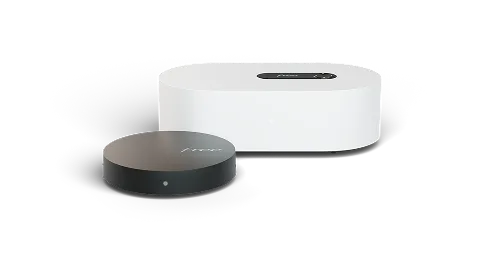
The Freebox is the box Free supplies in France; the part that handles internet and Wi-Fi is the Server. You manage it in the Free app, which absorbed Freebox Connect in January 2026, or in Freebox OS in a browser at mafreebox.freebox.fr.
- Sign in
mafreebox.freebox.fr- App
- The Free app (iOS and Android), in Espace Abonné Freebox (Freebox subscriber area)
- Password
- Freebox OS has no printed admin password: you choose one the first time you sign in, and confirm it on the Server’s display. The Free app uses your Free subscriber ID and password instead. The Wi-Fi key is on the Server’s display (press the down arrow) and in the app.
- Models
- Freebox Ultra, Freebox Pop, Freebox Delta, Freebox Révolution
Sign in to the Freebox
Connect your Mac to the Freebox by Wi-Fi or Ethernet.
Open
mafreebox.freebox.frin your browser.The first time, click Première connexion (First sign-in).
At the Server, press the right arrow beside the display to allow the password change.
Back on the Mac, choose the password, then sign in with it and click Connexion (Sign in).
To use the Free app, pair the box first: in Espace Abonné Freebox, tap Appairez votre Freebox › Associer ma Freebox (Pair your Freebox) and confirm on the Server’s display.
Restart it properly
Free says a restart clears minor faults and also checks for a software update. The Server is working again once the clock shows on its display.
Open the Free app and, in Espace Abonné Freebox, go to Server internet.
Tap Redémarrer (Restart), then Redémarrer le Server internet.
Wait for the time to reappear on the Server’s display.
Don’t use the start-up menu’s Paramètres d’usine (Factory settings) to fix a glitch: it wipes your Wi-Fi, router and sharing settings. Free suggests trying Démarrage secours (Rescue start) first.
From Freebox OS
Sign in at
mafreebox.freebox.fr.Click the Free logo at the bottom left, then Redémarrer la Freebox (Restart the Freebox).
From the Server’s display
On a Freebox Pop, press any arrow key beside the display to wake it.
Press down until Redémarrer shows, then press the right arrow (OK).
Schedule a restart
There is no scheduled restart. The app’s Coupure planifiée du Wi-Fi (Scheduled Wi-Fi cut) and, on the Ultra, Veille planifiée (Scheduled standby) only switch Wi-Fi or services off at set times.
Update the firmware
Open the Free app and select your Server in Espace Abonné Freebox; the software version shows there when available.
Or, on a Pop or Ultra, use the display arrows to open Informations avancées › Version (Advanced information › Version).
On a Delta, open Version; on a Révolution, open Système › Version (System › Version).
To be told about updates, open the app’s Réglages › Alertes et notifications and turn on Mise à jour du Freebox Server.
Free updates the Server itself; there is no manual firmware upload. A restart makes it look for a pending update. If an update won’t download, Free advises unplugging and replugging the Server.
See connected devices
Open the Free app and, in Espace Abonné Freebox, tap Appareils (Devices).
Tap a device to see its details, such as its IP and MAC address.
From there you can rename it, block it or add it to a parental-control profile.
For alerts, turn on Nouvel appareil connecté (New device connected) under Réglages › Alertes et notifications.
UPnP and port forwarding
The Freebox Server has a UPnP IGD service that lets devices on your network open port forwards. Free’s developer documentation shows it can be switched on or off and set to protocol version 1 or 2.
Sign in to Freebox OS at
mafreebox.freebox.fr.Open Paramètres de la Freebox (Freebox settings) and switch to Mode avancé (Advanced mode).
Open the UPnP IGD settings and turn the service on or off.
Choose protocol version 1 or 2, then save.
UPnP lets any app or device on your network open ports in the Freebox without asking, which malware can abuse too. Leave it off unless a game, console or app needs it, and use a fixed port forward where you can.
NAT-PMP
Free documents no NAT-PMP setting. For fixed port forwards, use Redirection de port (Port forwarding) in the app’s Paramètres réseau avancés.
Bridge mode
In bridge mode (Paramètres de la Freebox › Mode avancé › Mode Réseau), the Freebox turns off UPnP IGD, UPnP A/V and its Wi-Fi.
Prioritise calls and gaming
Open the Free app and tap Appareils (Devices).
Tap the device you want to manage.
Give it priority for work calls or gaming, or cap the bandwidth of a heavy device.
2.4 and 5 GHz, and the channel
By default the Freebox uses one network name for all bands (Unique). Free recommends keeping that and running the app’s Diagnostic réseau (Network diagnosis), which adjusts Wi-Fi settings for you.
Open the Free app and, in Espace Abonné Freebox, go to Mon Wi-Fi (My Wi-Fi).
Tap Modifier (Edit), then Type de configuration Wi-Fi (Wi-Fi configuration type).
Choose Séparée (Separate) and tap Enregistrer les modifications (Save changes).
Give each band its own name and key.
Change the channel
In Mon Wi-Fi, tap Modifier › Accéder aux paramètres avancés (Edit › Advanced settings).
Set the Canal primaire (Primary channel) and Largeur de bande (Channel width) for each band.
Tap Valider (Confirm).
Freebox OS has the same settings under Paramètres de la Freebox › Wi-Fi, in Mode avancé.
Connect a 2.4 GHz-only gadget
In Appareils, tap + › Ajouter un appareil en 2,4 GHz › Forcer temporairement le 2.4 GHz. The other bands switch off for up to 15 minutes while you connect it.
Éco Wi-Fi
Éco Wi-Fi switches off unused bands to save power. Turn it off under Mon Wi-Fi › Modifier › Accéder aux paramètres avancés › Optimisation électrique if a band keeps disappearing.
Mesh: which node a device uses
The Freebox extends its Wi-Fi with Free’s own Répéteur Wi-Fi, ordered from your subscriber area. Some Freebox plans include a first repeater.
Plug the repeater in where it still gets a good signal; it sets itself up in under two minutes.
If it shows an orange light, move it closer to the Server or another repeater.
To pair it by hand, tap + beside Mes équipements Freebox (My Freebox equipment) in the app and choose Répéteur.
Tap Installer mon répéteur › Autoriser mon répéteur, then scan its QR code or enter its installation code.
Guest network
Open the Free app and, in Espace Abonné Freebox, go to Mon Wi-Fi.
Open Wi-Fi invités (Guest Wi-Fi) and tap Créer une clé invités (Create a guest key).
Choose or generate a key, how long it lasts and the access level, then tap Créer.
Share it with Partager (Share) or the QR code.
Free recommends the Internet uniquement (Internet only) access level, so guests can’t reach your own devices.
DNS settings
Unlike many French boxes, the Freebox lets you change the DNS servers it hands out.
Open the Free app and, in Espace Abonné Freebox, go to Mes équipements Freebox › Server internet.
Open Paramètres réseau avancés (Advanced network settings).
Change the DNS servers, for example to
1.1.1.1or8.8.8.8, and save.
Connection status and logs
Open the Free app and, in Espace Abonné Freebox, go to Mes équipements Freebox › Server internet.
Open État de la connexion (Connection status) for your connection type and speeds.
For a slow device, go to Assistance › Diagnostic réseau › Dépanner un appareil qui est lent (Troubleshoot a slow device).
Pick the device and read the result and advice.
Manuals and downloads
Links go to the maker’s own pages.
Questions
Do I still need Freebox Connect?
No. Since January 2026 its features are in the Free app, which signs in with your Free subscriber ID and password. Free suggests uninstalling Freebox Connect once the Free app is set up.
Sources
- Assistance Free: Freebox OS, accéder à Freebox OS depuis mon domicile (Freebox Pop)
- Assistance Free: Application Free, comment redémarrer mon Server internet ? (Freebox Pop)
- Assistance Free: Réinitialiser mon Server Freebox
- Assistance Free: Où retrouver la version logiciel de mon Server internet ou Player TV ?
- Assistance Free: Application Free, comment être notifié des activités sur ma Freebox ?
- Assistance Free: Application Free, comment associer ma Freebox ?
- Assistance Free: Comment passer ma Freebox au mode Bridge ?
- Freebox OS developer API documentation: UPnP IGD
- Assistance Free: Application Free, comment séparer mon réseau Wi-Fi ?
- Assistance Free: Application Free, où changer mes canaux Wi-Fi ?
- Assistance Free: Application Free, comment connecter un appareil au Wi-Fi 2,4 GHz ?
- Assistance Free: Application Free, comment gérer le mode Éco Wi-Fi ?
- Assistance Free: Application Free, comment réinstaller mon Répéteur Wi-Fi ?
- Assistance Free: Installer mon Répéteur Wi-Fi
- Assistance Free: Application Free, comment créer un Wi-Fi invités ?
- Assistance Free: Application Free, comment configurer les paramètres avancés de ma Freebox ?
- Assistance Free: Application Free, où consulter les détails de ma connexion internet ?
- Assistance Free: Application Free, comment diagnostiquer un appareil qui semble lent ?
- Portail Free: Les applications Freebox Connect et Free fusionnent
Checked on 1 November 2026.
See what your router can’t tell you
Kilobat is a Mac menu-bar app that watches the network from your side: which app is using it, whether the Wi-Fi, the router or the provider is slow, and why a call froze.
brew install seifip/kilobat/kilobat