Internet provider · Connectivity hell
Sky Broadband
Have you tried turning the provider off and on again.
Public Wi-Fi complaints
As of 5 November 2026. The chart shows complaints per full UTC day since tracking began. See how this is counted.
Public complaints
In their own words
Examples behind the count. The wall moves on its own; hover, focus or touch it to pause.
Practical help
Check Sky Broadband, then make a case
Start with the provider’s own equipment and outage checks. Save your plan wording, repeatable measurements and support reference before asking for an investigation.
Applies to: Sky Max Hub and Sky Gigafast+ Hub on firmware 8.6, Sky Broadband Hub on 7.04, and the My Sky app (menus as of 2026). Sky Hub and Sky Q Hub no longer get security updates. · Checked 3 November 2026.
Check your Sky Hub
These checks apply to Sky Hub. Check the model before following its menus.
Check Sky Service Status at
sky.com/help/servicestatusfor outages in your area.Sign in to Sky’s Service Checker with your Sky iD to test your line.
Check the hub light. On a Max Hub, white is connected and flashing amber is still connecting.
On older hubs, open
192.168.0.1for the Summary Status page.
Separate the service from your home Wi-Fi
For the exact settings and supported equipment, see the Sky Hub guide.
Do not factory-reset the equipment as a first step. A reset can erase service settings and interrupt phone service.
Compare a wired connection to the router with Wi-Fi on the same device.
Repeat the same test server during the slowdown and at a quieter time.
Record download, upload, latency and whether another household device was using the connection.
How to complain to Sky
Use Sky’s official support to report the fault. Request a formal complaint reference if it remains unresolved.
Include the plan wording, dates, test conditions, previous references and the specific outcome you want. Ask for a written response.
For the local escalation route and conditions, follow the United Kingdom complaint guide.
Official credit or compensation information
Check Sky’s published claim or compensation route. Review its current conditions for the fault you experienced.
A total loss of service, intermittent faults and slow speeds can follow different rules. A report does not establish eligibility by itself.
Public data: complaints reported to Ofcom
Ofcom publishes provider comparisons for fixed broadband complaints. Use the same reporting period and service category when comparing providers.
Complaints reaching the regulator are different from all complaints made to a provider. They do not measure the speed or reliability of your individual line.
Collect the evidence with Kilobat
On a Mac, Kilobat can record connection checks and produce a support report. Review the report and add your test conditions before sharing.
The basic report export is free. Kilobat Pro’s complaint wizard helps assemble your evidence, impact and requested resolution into a draft you review and send.
Measurements cover this Mac while monitoring ran. They cannot prove whole-home uptime, establish provider fault or replace a required official measurement procedure.
Provider sources (18)
- Sky Help: Advanced settings for Sky Max and Gigafast+ Hub ↗
- Sky Help: Access your Sky Broadband hub settings ↗
- Sky Help: Change your Sky Broadband hub WiFi settings (other hubs) ↗
- Sky Help: Change your WiFi settings for Sky Max or Gigafast+ Hub ↗
- Sky Help: Can’t connect to VPN (Sky Max or Gigafast+ Hub) ↗
- Sky Help: Sky Broadband hub and booster software ↗
- Sky Help: No connection or slow WiFi – WiFi drops out ↗
- Sky Help: Prioritise a device on your WiFi ↗
- Sky Help: Sky WiFi Max ↗
- Sky Help: Connecting older devices to Sky Max or Gigafast+ Hub ↗
- Sky Help: How to set up your Sky Max Pod ↗
- Sky Help: My device doesn’t switch between my hub and extender’s WiFi ↗
- Sky Help: Lights on your Sky hub explained (Sky Max Hub) ↗
- Sky Help: The hub light is flashing blue (Sky Max Hub) ↗
- Sky Help: Sky Broadband Shield ↗
- Sky Help: No connection or slow WiFi ↗
- Sky: claim or compensation information ↗
- Ofcom: telecoms complaints by provider ↗
Your rights and escalation route
What to do if the provider does not fix it
Rules depend on where the service is supplied and on your agreement. These jurisdiction guides explain the documented process and link to official sources.
UK broadband below minimum speed: complaints and leaving your contract
Your minimum guaranteed speed matters more than the headline average. Find the commitment your provider gave you before choosing a complaint route.
Find your minimum guaranteed download speed
Look in your order confirmation and contract. Record the minimum, the address-specific estimate and any measurement conditions.
Under Ofcom’s voluntary broadband speeds code, participating providers give a minimum guaranteed speed. A Wi-Fi test alone may not measure that commitment.
Give the provider the evidence and a chance to fix it
Report the speed problem and keep the reference and date. Follow the provider’s requested diagnostics and retain the results.
Ofcom says you may be able to leave without penalty if the speed remains below the minimum and cannot be fixed within 30 calendar days.
Check the provider’s code participation and the conditions applying to your service. Do not treat every slow result as an automatic cancellation right.
When can you use independent dispute resolution?
Make a formal complaint through your provider. Eligible unresolved complaints can go to its approved ADR scheme after six weeks, or earlier with a deadlock letter.
Ofcom does not resolve individual complaints. Use the provider’s complaints code to identify its approved scheme.
Prepare your complaint
Use the complaint template to state the problem, evidence and requested resolution. Keep the tone factual.
You can collect evidence without Kilobat. If you use a Kilobat report, review it before sharing and add your test conditions.
Still stuck?
You can ask for help at ping@kilobat.app. Send your symptoms and reviewed test results, with or without Kilobat.
Official sources
Find the failing hop
Give support something they can investigate.
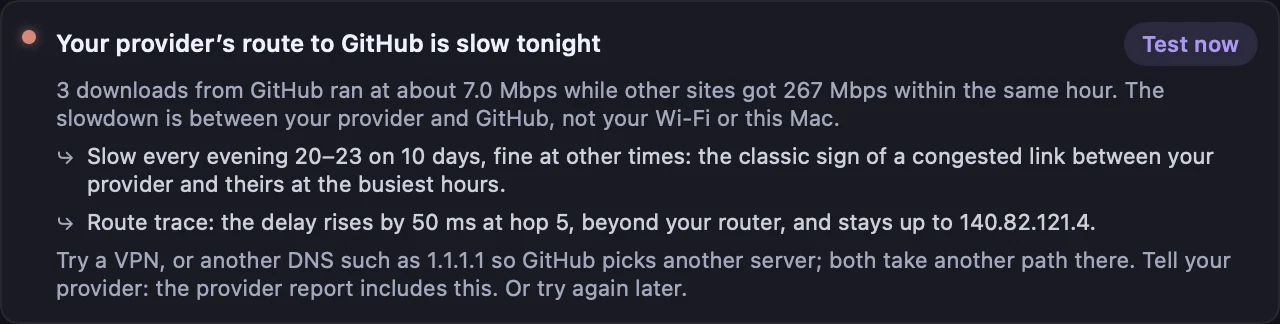
When a connection fails, Kilobat checks your Mac’s Wi-Fi, router, internet access and DNS in turn. That helps separate a local signal or router problem from a fault farther along the route.
Keep dated results and test conditions. The free support report helps you explain what happened. Kilobat Pro can assemble a reviewed PDF complaint pack with measurements, an incident timeline, your plan details and the remedy you request.
You decide what to include and send it yourself. Measurements from one Mac cannot establish service-wide uptime or prove operator fault.
PDF dossier · reviewed by you
Evidence you can send