Provider box · LG U+
LG U+ Wi-Fi router login, restart, updates and port forwarding
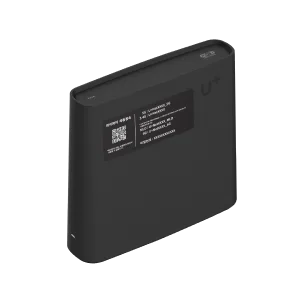
The U+ 와이파이 공유기 (U+ Wi-Fi router) is the box LG U+ rents out with its home internet. The current 기가 와이파이7 model is the GAPK-8100, made by Gaon Broadband. You manage it in a browser through its 관리자 웹 페이지 (admin web page).
- Sign in
wifi.uplus.co.kror192.168.219.1- Password
- The admin password is the 관리자 웹 접속 암호 (admin web access password) printed on the sticker underneath the router. The Wi-Fi name (
U+Netplus four characters) and Wi-Fi password are on a separate sticker on the front or top. - Models
- GAPK-8100, GAPD-7500R, GAPM-7500R, MAPK-1000
Sign in to the U+ 와이파이 공유기
Connect your Mac to the router by Ethernet or Wi-Fi.
On a GAPK-8100, open
http://wifi.uplus.co.kr. On older models, openhttp://192.168.219.1.On the home screen, click the login button.
Type the admin web access password from the bottom sticker.
Type the 보안 코드 (security code) shown on screen, then click 로그인 (Log in).
To change the password, open 공유기 설정 › 비밀번호 변경 (Router settings › Change password).
The new password needs 8 to 16 characters with letters, numbers and symbols. Forgotten it? Hold the 초기화 (Reset) button for five seconds or more; the sticker password works again, but most other settings are erased.
Restart it properly
Sign in to the admin web page.
Open 공유기 설정 › 시스템 관리 (Router settings › System management).
Click 재시작 (Restart). The router switches off and on again.
On the same page, 초기화 (Reset) returns the router to its factory settings; it isn’t a restart.
With the button
Press the 재부팅 (Reboot) button on the router.
On the GAPK-8100, the power light blinks white every three seconds while it restarts.
When the internet is down
Unplug the power and network cables from the modem, then the Wi-Fi router, then the computer.
Plug them back in in the same order. Without a modem, start with the router.
Schedule a restart
LG U+ documents no scheduled restart.
Update the firmware
LG U+ updates the router’s software automatically. There is no file to download.
To see the version, open 상태정보 › 인터넷 연결 정보 (Status › Internet connection information).
Read 소프트웨어 버전 (Software version).
If an update seems stuck, check LG U+’s instructions for your model or contact support before disconnecting power.
The GAPD-7500R’s 공유기 설정 menu also lists 업그레이드 (Upgrade), but LG U+ doesn’t describe it. While software downloads, the GAPK-8100’s power light blinks white every half second. Don’t unplug it then.
See connected devices
Sign in and open 상태정보 › DHCP 할당정보 (Status › DHCP assignment information).
The list shows each device’s IP address, host name and MAC address.
To keep an address for one device, use the DHCP 고정 할당 (Fixed DHCP assignment) tab.
On the 7500R models, 인터넷 연결 정보 also has 무선 Client 보기 (View wireless clients) for each band.
UPnP and port forwarding
LG U+’s manuals and help pages don’t mention UPnP or NAT-PMP. The NAT 설정 (NAT settings) menu only documents port forwarding, a DMZ and NAT-T, so open ports by hand.
LG U+ says the router’s firewall blocks P2P and game connections until you forward their ports. Forward only what an app needs, and give that device a fixed address. LG U+ warns that DMZ 서버 (DMZ server) turns the firewall off for one device, which risks viruses and hacking.
Forward a port instead
Sign in and open 네트워크 설정 › NAT 설정 (Network settings › NAT settings).
Click 포트포워딩 (Port forwarding), then 추가 (Add).
Enter the 서비스 포트 (Service port) and 프로토콜 (Protocol).
Enter the device’s 내부 IP 주소 (Internal IP address) and 내부 포트 (Internal port), then click 추가.
Click 설정 적용 (Apply).
Prioritise calls and gaming
There is no device priority or QoS setting. The status page shows a QoS 상태 line, but nothing there can be changed.
2.4 and 5 GHz, and the channel
The GAPK-8100 broadcasts 2.4 GHz, 5 GHz and 6 GHz networks plus an MLO network that uses several bands at once. Each has its own name, such as U+NetXXXX_5G, and its own password. On the 7500R models, giving 2.4 GHz and 5 GHz the same name lets devices pick the better band.
On a GAPK-8100, click 설정바로가기 (Go to settings) next to the network on the home screen.
On a 7500R, open 네트워크 설정 › 무선 네트워크 설정 (Wireless network settings) and pick the band.
Under 채널 설정 (Channel settings), choose a channel instead of automatic.
Click 설정 적용 (Apply). Wi-Fi devices drop and reconnect.
Channels 1–13 are available on 2.4 GHz, 36–161 on 5 GHz and 1–221 on 6 GHz. Leave the country set to KOREA, REPUBLIC OF, or Wi-Fi may stop working. If an older laptop can’t see the GAPK-8100, change each band’s 동작 모드 (Mode) under 고급설정 보기 (Advanced) to one without “BE”. That turns MLO off.
Mesh: which node a device uses
The U+ 기가와이파이메쉬 (Giga Wi-Fi Mesh) unit, MAPK-1000, extends an LG U+ router’s Wi-Fi under the same name and password. Its manual lists the GAPM-7100, 7200, 7500 and 8000, the GAPD-7100, 7200, 7300 and 7500, and the GAPK-7600 as main routers.
Place the mesh unit within 1 m of the main router and plug it in.
Wait until its power light stops blinking white and stays on.
Hold the mesh unit’s 무선연결 (Wireless connect) button for five seconds. The light blinks green.
Press the main router’s Wi-Fi auto-connect (WPS) button for one second.
Wait up to 2½ minutes for a steady green light, or five minutes if it updates.
Move it halfway to the weak spot and plug it in again; mesh mode returns automatically.
A blinking red light means the signal is weak, so move it closer. Reset the mesh unit before switching from wireless to wired, or after changing the main router. It has no admin address of its own: open the main router’s page and pick it under 무선브릿지 (Wireless bridge).
Wired mesh
Before powering the mesh unit, run a cable from its 인터넷 (Internet) port to a LAN port on the main router.
Plug in its power. The light turns green within about two minutes.
Guest network
LG U+ documents no guest network on these routers.
DNS settings
LG U+ documents no way to change the DNS servers the router uses or hands out. 인터넷 연결 정보 shows the ones in use. Set DNS on the Mac instead.
Connection status and logs
Sign in and open 상태정보 › 인터넷 연결 정보 (Internet connection information). It refreshes every ten seconds.
It shows the connection state, external IP address, gateway, DNS servers and Wi-Fi channels.
상태정보 › 네트워크 통계 (Network statistics) shows traffic and errors for each port.
상태정보 › 시스템 로그 (System log) lists events. Click 로그 저장 (Save log) to keep a copy.
On the GAPK-8100, the internet light is green at 100 Mbps, blue at 1 Gbps and orange at 2.5 or 5 Gbps. Green on a gigabit plan means you should reseat the cable.
Manuals and downloads
- LG U+ GAPK-8100 통합 사용 설명서 (full manual, PDF)
- LG U+ GAPD-7500R 통합 사용 설명서 (full manual, PDF)
- LG U+ 기가와이파이메쉬 MAPK-1000 통합 사용 설명서 (mesh manual, PDF)
- LG U+ 사용 설명서/프로그램 (manuals and downloads)
Links go to the maker’s own pages.
Questions
Where is the Wi-Fi password on an LG U+ router?
On the sticker on the router. LG U+ says the 무선랜암호 (wireless LAN password) there is the Wi-Fi password, 12 digits on its routers. If you change it, the QR code on the sticker stops working.
Can I reach the admin page from outside my home?
On the 7500R models, 네트워크 설정 › 세부 설정 › 원격제어 (Remote control) turns it on, with its own password and port 88. Leave it off unless you need it.
Sources
- LG U+: 와이파이 공유기 GAPK-8100 통합 사용 설명서 (PDF, 2025)
- LG U+: 와이파이 공유기 GAPD-7500R 통합 사용 설명서 (PDF, 2024)
- LG U+: 와이파이 공유기 GAPM-7500R 통합 사용 설명서 (PDF, 2024)
- LG U+: U+기가와이파이메쉬 공유기 (MAPK-1000) 통합 사용 설명서 (PDF)
- LG U+: 손쉬운 와이파이 공유기 개통 가이드 (router swap guide, PDF)
- LG U+ 자주하는 질문 (FAQ): firmware updates, Wi-Fi ID and password, P2P port forwarding, outages
- LG U+: 사용 설명서/프로그램 (manual downloads)
- LG U+: 와이파이 (Wi-Fi service and routers)
Checked on 1 November 2026.
See what your router can’t tell you
Kilobat is a Mac menu-bar app that watches the network from your side: which app is using it, whether the Wi-Fi, the router or the provider is slow, and why a call froze.
brew install seifip/kilobat/kilobat